
Linux Command Line for Bioinformatics
Chapter 3 of 5: Search and count in FASTA, FASTQ, GTF and VCF files
Most everyday questions in bioinformatics are simple counts: how many sequences, how many reads, how many genes, how many variants passed the filter? This chapter answers each one with a short command. Run them inside ~/bhl-linux.
FASTA: count sequences and measure their lengths
In a FASTA file, every sequence starts with a header line beginning with >, followed by one or more sequence lines. So the number of sequences equals the number of lines that start with >.
grep -c '^>' data/genome.fa
grep '^>' data/genome.fa
grep pattern file: print lines that match the pattern-c: print only the number of matching lines'^>':^means “start of the line”, so only lines that begin with>match
Always put the pattern in quotes. Without quotes, the shell reads > as “write output to a file”. The command grep -c > data/genome.fa would not search anything; it would empty your genome file.
To measure each sequence, we use awk, a small language for line-by-line processing. This one-liner remembers the name at each header and adds up the lengths of the sequence lines below it:
awk '/^>/ {if (name) print name, len; name = substr($1, 2); len = 0; next}
     {len += length($0)}
END {print name, len}' data/genome.fa▸ Go deeper: how awk reads a file (pseudo-code)
awk runs the same small program on every line. Each rule is a pattern (which lines) followed by an action in braces (what to do). $0 is the whole line, $1 the first field, NR the line number, and END runs once after the last line.
for each line in the file:
    NR = line number; $0 = the line; $1, $2 ... = its fields
    if the line starts with ">":            # pattern /^>/
        if a name is stored: print name, len
        name = first field without ">"      # substr($1, 2)
        len = 0
        skip to the next line               # next
    otherwise:
        len = len + length of the line
after the last line:                        # END
    print name, len
The last sequence has no header after it, which is why the END block prints it.
GC content
GC content is the share of G and C bases among all bases: GC% = 100 × (G + C) ÷ (A + C + G + T). Two ways to get it:
grep -v '^>' data/genome.fa | tr -d '\n' | fold -w1 | sort | uniq -c

awk '!/^>/ {gc += gsub(/[GCgc]/, ""); at += gsub(/[ATat]/, "")}
END {printf "GC = %.1f%%\n", 100*gc/(gc+at)}' data/genome.faCheck it by hand: (79 + 64) ÷ (81 + 79 + 64 + 61) = 143 ÷ 285 = 50.2%. The first command is easy to read but slow on big genomes (one line per base); the awk version is the one to keep.
🔬 Researcher notes
FASTA dates back to the FASTA sequence-comparison programs (Pearson & Lipman, 1988, PNAS 85(8):2444–2448, doi:10.1073/pnas.85.8.2444). There is no single formal specification, so headers vary between databases: Ensembl, NCBI and UCSC name the same chromosome 1, NC_000001.11 or chr1. Checking names with grep '^>' before alignment avoids the most common “no reads mapped” mistake.
Lowercase letters in many reference genomes mark soft-masked repeats. The awk command above counts both cases. For indexed, large-scale work use samtools faidx genome.fa, which writes each sequence’s length to genome.fa.fai (Danecek et al., 2021, GigaScience 10(2):giab008, doi:10.1093/gigascience/giab008).
FASTQ: count reads the right way
A FASTQ read always takes exactly four lines: header, sequence, a + line, and quality. So the number of reads is the number of lines divided by four.
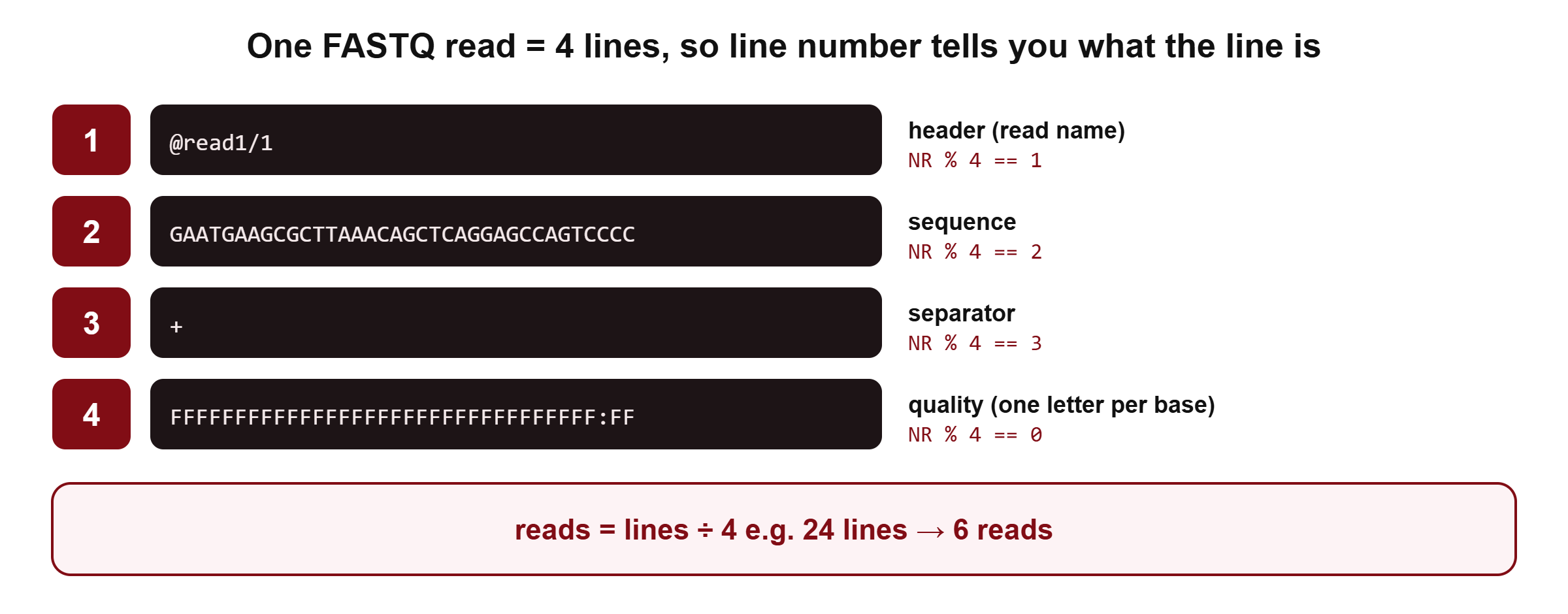
echo $(( $(zcat data/reads_R1.fastq.gz | wc -l) / 4 ))$( ... ): run the command inside and use its output as text$(( ... )): do whole-number arithmetic
The line number also tells you what each line is. NR % 4 is the remainder after dividing the line number by 4: it is 2 for every sequence line and 0 for every quality line.
zcat data/reads_R1.fastq.gz | awk 'NR % 4 == 2' | head -n 2
zcat data/reads_R1.fastq.gz | awk 'NR % 4 == 2 {print length($0)}' | sort -n | uniq -cThe second command is a read-length histogram: all 6 reads are 36 bases long. After adapter trimming (see our FastQC and MultiQC tutorial) you would see several lengths here.
grep can also search the reads. The Illumina adapter starts with AGATCGGAAGAGC, and an N marks a base the machine could not call:
zcat data/reads_R1.fastq.gz | grep -c AGATCGGAAGAGC
zcat data/reads_R1.fastq.gz | awk 'NR % 4 == 2' | grep -c NQuick check: why not count reads with grep -c ‘^@’?
Because @ is also a valid quality character (it stands for Phred 31). A quality line can start with @, so grep -c '^@' can count some reads twice. Lines ÷ 4 is always right.
▸ Go deeper: why lines ÷ 4 works, and when it does not
Modern FASTQ files (Illumina, MGI, ONT basecallers) write each read on exactly four lines. Some very old files wrapped long sequences over several lines; the four-line rule fails for those, and tools such as seqkit stats handle both cases. If the line count is not a multiple of 4, the file is truncated or corrupted, which often happens when a download was interrupted.
🔬 Researcher notes
The FASTQ format and its quality encodings are described by Cock et al. (2010, Nucleic Acids Res 38(6):1767–1771, doi:10.1093/nar/gkp1137). Phred scores come from Ewing & Green (1998, Genome Res 8(3):186–194, doi:10.1101/gr.8.3.186).
Before analysing a download, check its integrity. Repositories publish MD5 checksums; compare with md5sum file.fastq.gz (or md5sum -c checksums.md5 for many files). A silent truncation can otherwise look like a short but valid file.
GTF and VCF: work with columns
GTF (genes) and VCF (variants) are tab-separated tables. Each line is one record, and each column is a field you can pick by number.
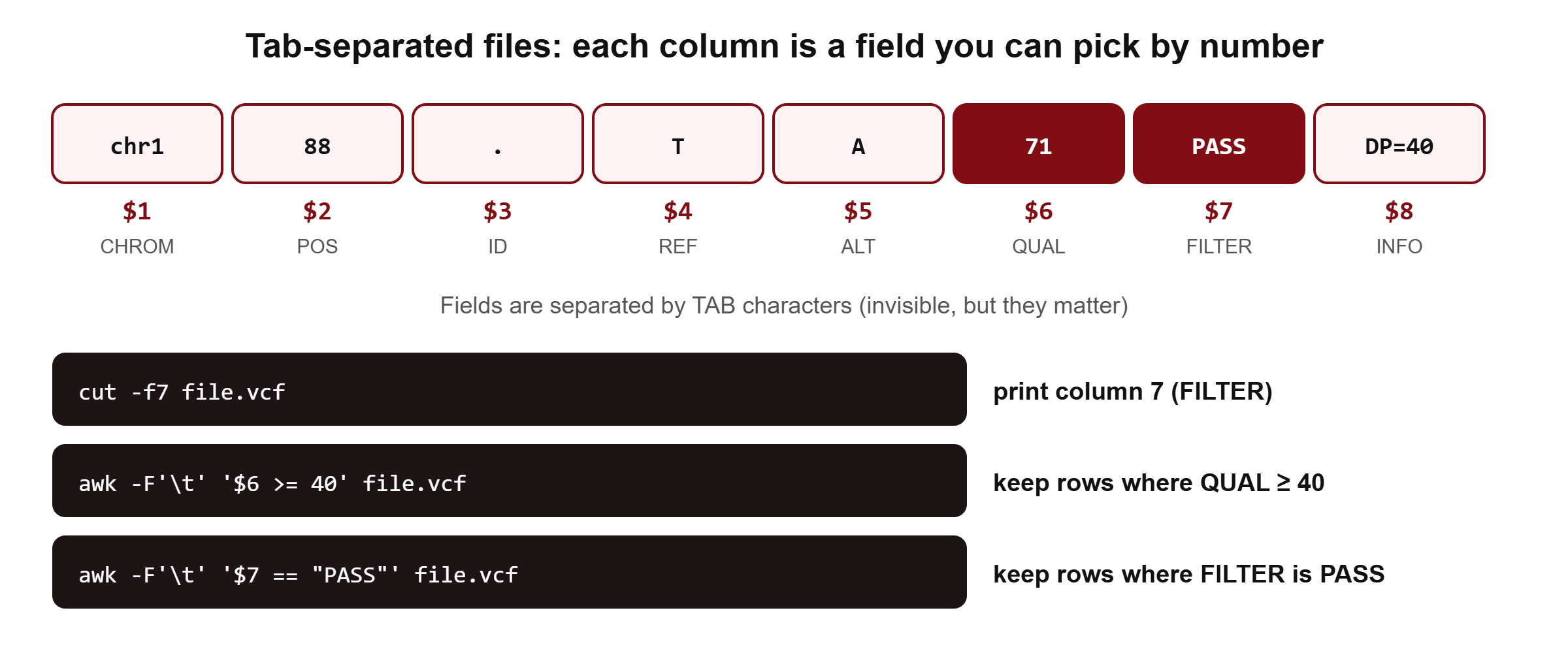
Count features in a GTF file
cut -f3 data/genes.gtf | sort | uniq -ccut -f3: keep column 3 (the feature type);cutsplits on tabs by defaultsort: put identical lines next to each otheruniq -c: collapse neighbouring identical lines and count them
▸ Go deeper: why sort must come before uniq
uniq only compares each line with the line just before it. It never looks further back.
previous = none; count = 0
for each line:
    if line == previous: count = count + 1
    else:
        if previous is not none: print count, previous
        previous = line; count = 1
print count, previous
Without sort, the input gene exon exon gene gives three groups (1 gene, 2 exon, 1 gene) instead of two. Sorting first puts every identical value together, so each value is counted once.
awk can filter rows and do arithmetic on columns. Here we list each gene with its chromosome, start, end, strand and length:
awk -F'\t' '$3 == "gene" {print $1, $4, $5, $7, $5 - $4 + 1}' data/genes.gtf-F'\t' tells awk that columns are separated by tabs. This matters: by default awk splits on any run of spaces and tabs, so the GTF attribute column, which contains spaces, would be cut into extra fields.
🔬 Researcher notes
Coordinates differ between formats. GTF and VCF are 1-based and inclusive, so length = end − start + 1. BED, the UCSC browser format, is 0-based and half-open, so length = end − start (Kent et al., 2002, Genome Res 12(6):996–1006, doi:10.1101/gr.229102). Mixing them causes off-by-one errors; bedtools expects BED conventions (Quinlan & Hall, 2010, Bioinformatics 26(6):841–842, doi:10.1093/bioinformatics/btq033).
Count and filter variants in a VCF file
A VCF file starts with header lines beginning with #. grep -v inverts the match, so it keeps only the variant lines:
grep -v '^#' data/variants.vcf | wc -l
grep -v '^#' data/variants.vcf | cut -f7 | sort | uniq -cNow the two best PASS variants by quality (column 6), sorted from high to low:
awk -F'\t' '!/^#/ && $7 == "PASS"' data/variants.vcf | sort -t$'\t' -k6,6nr | cut -f1,2,4,5,6 | head -n 2!/^#/ && $7 == "PASS": not a header line and FILTER equals PASSsort -t$'\t' -k6,6nr: sort by column 6 only, numerically (n), in reverse (r)cut -f1,2,4,5,6: keep CHROM, POS, REF, ALT and QUAL
🔬 Researcher notes
The VCF format is defined by Danecek et al. (2011, Bioinformatics 27(15):2156–2158, doi:10.1093/bioinformatics/btr330) and maintained by GA4GH (hts-specs). awk is fine for a first look, but real VCFs are compressed (.vcf.gz), indexed, and can contain multi-allelic sites and per-sample columns. For analysis, use bcftools view and bcftools query, which understand the format; our variant-calling tutorials use them.
Which command for which file
| File | Count records | First look | Watch out |
|---|---|---|---|
FASTA (.fa) | grep -c '^>' | head, grep '^>' | Quote the >; chromosome names differ between sources |
FASTQ (.fastq.gz) | lines ÷ 4 | zcat … | head -n 8 | Never count @; always zcat first |
GTF (.gtf) | cut -f3 | sort | uniq -c | head, less -S | 1-based; use awk -F'\t' |
VCF (.vcf) | grep -v '^#' | wc -l | grep -v '^##' | head | Many header lines; use bcftools for real work |
BED (.bed) | wc -l | head | 0-based, half-open |
Defaults that trip people up
| Command | Default behaviour | Why it matters |
|---|---|---|
head, tail | 10 lines | Use -n for FASTQ (multiples of 4) |
cut | Splits on TAB | Spaces need -d ' ' |
awk | Splits on runs of spaces and tabs | Use -F'\t' when columns contain spaces |
uniq | Compares neighbouring lines only | Always sort first |
sort | Text order, set by your locale | Use -n for numbers; LC_ALL=C sort is faster and identical on every machine |
wc -l | Counts newline characters | A last line without a newline is not counted |
grep -c | Counts matching lines | Two matches on one line count once |
gzip | Replaces the original file | Use gzip -k to keep it |
🔬 Researcher notes
Locale affects sort order: with LANG=en_US.UTF-8, case and punctuation can be ignored, while LC_ALL=C compares raw bytes. Tools that need sorted input (join, comm, some bedtools commands) can fail or silently miss matches when two steps sort with different locales. Setting export LC_ALL=C at the top of a pipeline script makes results reproducible across machines and is usually faster on large files.