Bioinformatics training is expensive. A university certificate course can cost thousands of rupees, and international programmes cost far more. For many students in India, the real question is not “which course is best?” but “how far can I get without paying anything?”
The honest answer is: a long way, if you choose the right resources and use them properly. This guide covers the free bioinformatics courses and tutorials available today. It starts with the free tutorials and videos from Bio Help Learning, then goes through the other strong free options: NPTEL, EMBL-EBI, the Galaxy Training Network, Rosalind and sandbox.bio.
You will also see what “free” really means on each platform, a learning path to follow, a four-week study plan, and an honest section on what free learning cannot give you. By the end you should know exactly where to start today.
What “free” really means in bioinformatics courses
“Free” is used loosely online. A course can be free to watch but charge for the certificate. It can be free to read but give you nothing to practise on. Some platforms that were fully free a few years ago have changed their model. Before you choose free bioinformatics courses, check three separate things:
- Learning content: can you read or watch every lesson without paying?
- Hands-on practice: do you get real data, real commands and exercises, or only slides?
- Certificate: is there one, and what does it cost?
Hands-on practice matters most. Bioinformatics is a practical skill, like driving. You can watch a hundred videos about the command line and still freeze the first time you open a terminal. A free course with real exercises is worth more than a paid course made only of lectures.
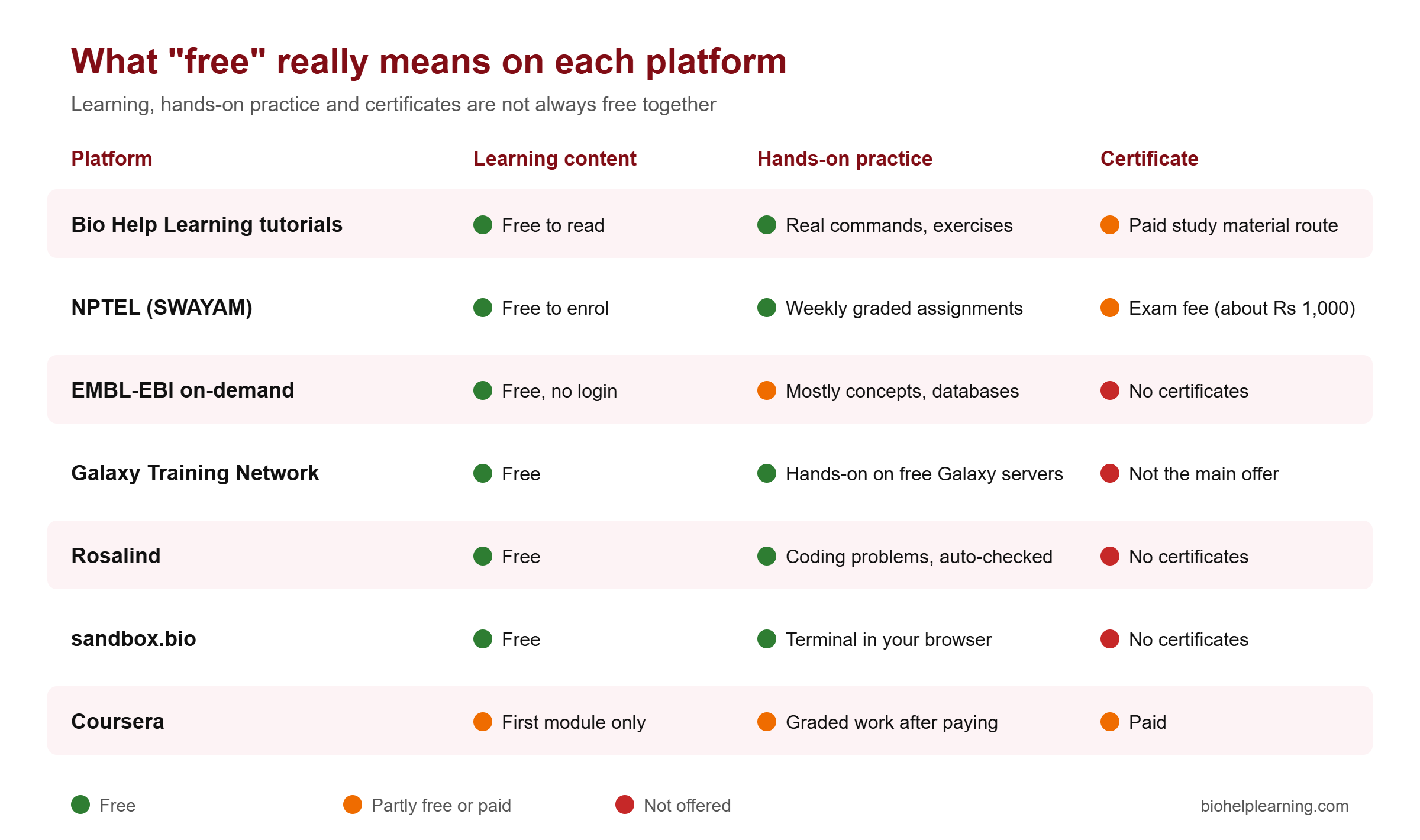
A big change happened on Coursera. In August 2025 it replaced its old free “audit” mode with a free preview. The preview gives you the first module of most courses, and the rest is locked until you pay. Many older blog posts still say you can audit Coursera bioinformatics courses free from start to finish. That is no longer true for most courses, so do not plan your learning around it.
Free bioinformatics tutorials from Bio Help Learning
Bio Help Learning runs a free tutorial section at biohelplearning.com/tutorials. The idea is simple: you learn bioinformatics step by step with real commands, and you do not pay to read anything. It is written for biotechnology and life-science students, MSc and PhD scholars and beginners who have never used a terminal.
What is live right now
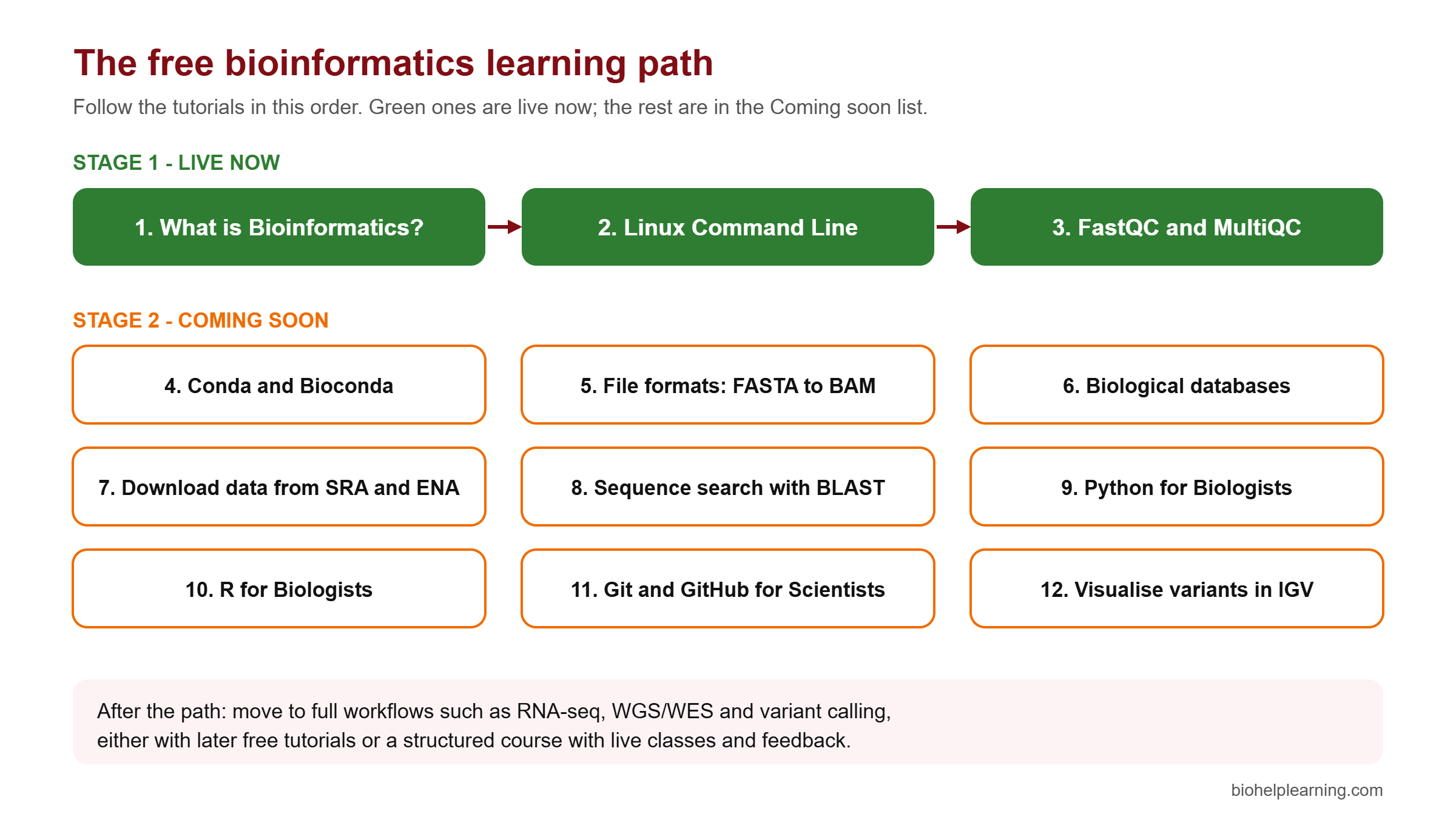
Right now, three free tutorials are published. Together they form the first learning path, Linux & NGS Fundamentals:
- What is Bioinformatics? A Complete Beginner’s Guide (about 38 minutes of reading). What the field is, how it connects biology and computing, and where it is used.
- Linux Command Line for Bioinformatics (about 35 minutes). The terminal, the shell, the file system and paths, your first commands (
pwd,ls,cd), then counting sequences in FASTA files and joining small tools with pipes. - Quality Control of NGS Reads with FastQC and MultiQC (about 35 minutes). The FASTQ format, Phred quality scores, why adapters appear at the end of reads, checking paired-end Illumina reads with FastQC, cleaning them with fastp, and comparing before and after in one MultiQC report.
These three are chosen on purpose. Almost every next-generation sequencing (NGS) project, whether RNA-seq, whole-genome or whole-exome sequencing, starts with Linux and read quality control. If you skip QC, problems in the reads flow quietly into alignment and variant calling, and you only notice when the results look wrong.
How each tutorial is built
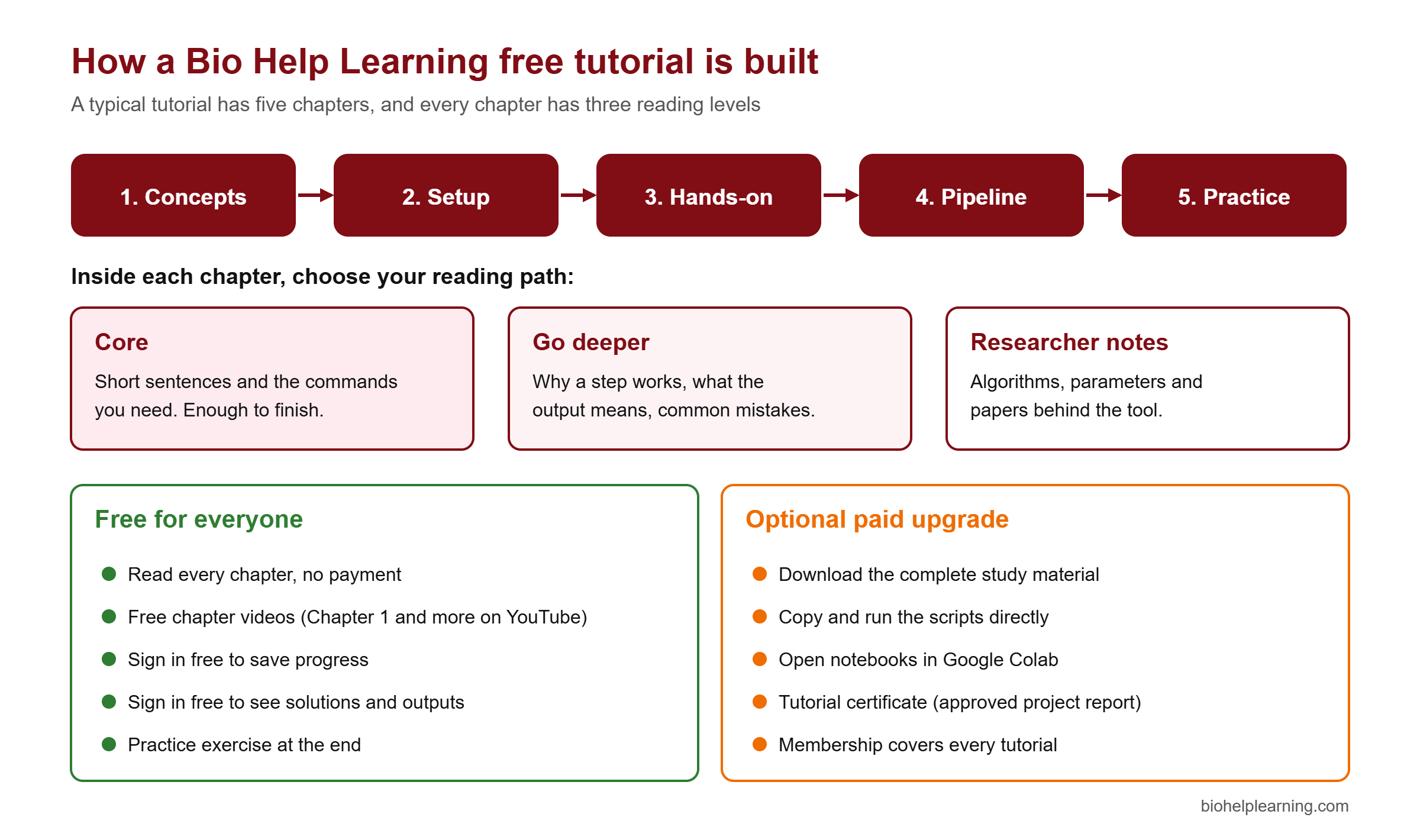
Each tutorial is split into about five chapter pages, with Next and Previous buttons. A typical tutorial moves from concepts, to setting up your tools, to hands-on commands, to a small pipeline, and ends with a practice exercise.
Inside every chapter you choose a reading path. The Core level gives short explanations and the commands you need, enough to finish the tutorial. Go deeper explains why each step works and what the output means. Researcher notes cover the algorithms, parameters and papers behind the tool. A beginner can stay on Core. A PhD scholar can read all three levels and not need another source.
What a free account adds
You can read every chapter without signing up. A free sign-in adds two things: it saves your progress so you can continue later, and it shows the solutions and expected outputs for the exercises. That second part matters. Checking your output against the expected one is how you learn to trust your own work.
One detail surprises some students: on the free plan, code blocks cannot be copied with one click. You type the commands yourself. This is a little slower, but typing is how command syntax sticks in memory. People who only copy and paste often cannot write the same command a week later.
If you want the files, there is an optional paid route. Buying a tutorial’s study material, or a membership that covers every tutorial, lets you download the complete material, run scripts directly, open notebooks in Google Colab, and earn a tutorial certificate. The certificate needs a project report that the team reviews and approves, so it shows real work. Reading stays free either way.
What is coming next
Nine more tutorials are being written and are listed in the Coming soon section of the tutorials page:
- Conda and Bioconda: install bioinformatics tools the right way
- Bioinformatics file formats explained: FASTA, FASTQ, SAM/BAM
- Biological databases: NCBI, Ensembl and UniProt
- Download sequencing data from SRA and ENA
- Sequence search with BLAST
- Python for Biologists
- R for Biologists
- Git and GitHub for Scientists
- Visualise alignments and variants in IGV
The plan is to keep adding tutorials every month until the free section covers the main areas of bioinformatics, from basics to full analysis workflows.
Free bioinformatics video tutorials on YouTube
Some people learn better by watching first. Each free tutorial is getting short chapter videos, and they are published free on the Bio Help Learning YouTube channel. At the time of writing, the channel has:
- FastQC Tutorial Part 1: FASTQ format and Phred quality scores explained (about 7 minutes)
- FastQC Tutorial Part 2: install and run FastQC with Conda, step by step (about 6.5 minutes)
- Linux for Bioinformatics, Chapter 1: your first commands (about 9 minutes)
- Linux for Bioinformatics, Chapter 2: build your project folder, including WSL2 on Windows (about 16 minutes)
- Two full recorded webinars on next-generation sequencing: Next Generation Sequencing & Data Analysis and Implementation of NGS in Your Research (each a little over an hour)
The best way to use the videos is together with the written chapter. Watch the short video to get the big picture, then open the written tutorial and do the commands yourself. A video alone shows you that something works. Typing it yourself shows you how it breaks, and that is where most of the learning happens.
Subscribe to the channel if you want a notice when new chapter videos go up. New tutorials and their videos are released through the month.
How to learn from free tutorials and actually remember it
Free resources have one big weakness: nobody checks whether you finished. Most people who start a free course never complete it. A simple routine fixes much of this. Use the same five-step loop for every chapter:
- Watch the chapter video, if there is one, to see the whole idea in a few minutes.
- Read the Core level of the chapter slowly. Note any word you do not know.
- Type and run every command on your own computer. On Windows, use WSL2 (Windows Subsystem for Linux), which lets you run Linux inside Windows.
- Check your output against the solution shown after free sign-in.
- Do the exercise without looking at the chapter. If you get stuck, go back, then try again.
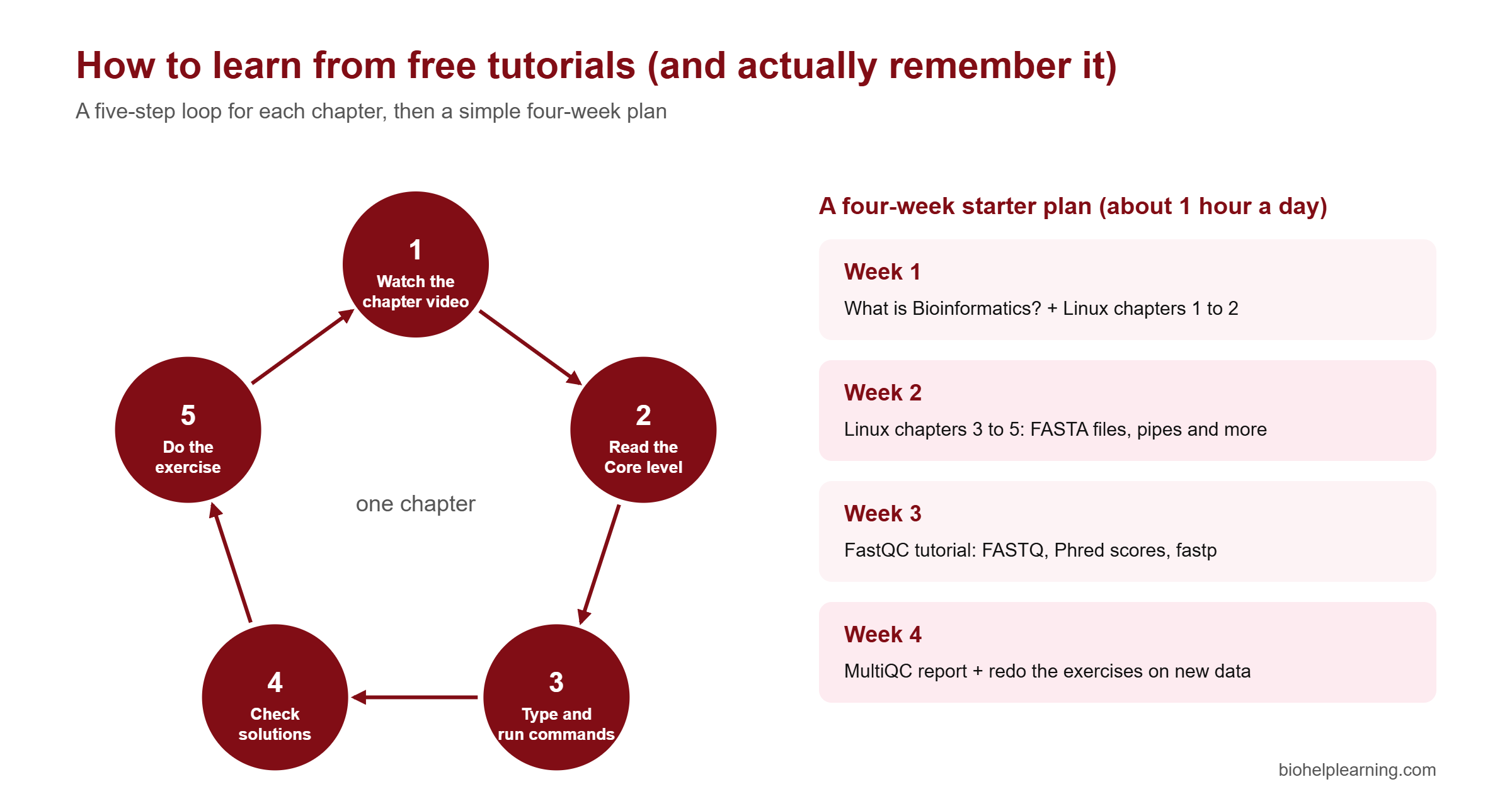
One hour a day is enough. In four weeks you can finish the three live tutorials properly. Do not rush to collect topics. A student who can run FastQC, read the report and explain why a sample failed is more useful in a lab than one who has watched twenty videos and run nothing.
Keep a simple notes file, in plain text or in a GitHub repository, with each command you learned and one line about what it does. After a month this becomes your personal reference. If you later build a portfolio, it also shows employers that you work in an organised way. Our guide to bioinformatics projects using Python shows how to turn this practice into small projects.
Other free bioinformatics courses worth your time
No single website teaches everything. These free resources are reliable, well maintained and used by universities around the world. Use them alongside the Bio Help Learning tutorials.
NPTEL (SWAYAM): free university courses from IITs
NPTEL runs free online courses taught by IIT and IISc faculty through the SWAYAM portal. Enrolment is free. If you want a certificate, you register for a proctored exam at a test centre, which usually costs about ₹1,000 per course (the fee can vary by course). The final score is 25% from weekly assignments and 75% from the exam.
The best known bioinformatics course is BioInformatics: Algorithms and Applications by Prof. M. Michael Gromiha of IIT Madras. It is a 12-week course covering sequence databases, alignment and BLAST, multiple sequence alignment and phylogenetic trees, protein structure and prediction, and computer-aided drug design. It is strong on theory and protein bioinformatics. It is lighter on modern NGS command-line work, so it pairs well with hands-on tutorials.
NPTEL courses run in two sessions a year, January to April and July to December, and enrolment closes a couple of weeks after the start. Check the current dates on the official portal before planning around them.
EMBL-EBI on-demand training
The European Bioinformatics Institute (EMBL-EBI) offers free self-paced online tutorials, recorded webinars and course materials. No registration is needed to read them. A free account lets you track what you have completed. The tutorial Bioinformatics for the terrified is a good first step for complete beginners.
EMBL-EBI is especially good for learning how to use major databases such as Ensembl, UniProt and the European Nucleotide Archive. It does not give certificates for its on-demand courses, and much of it focuses on concepts and web tools rather than command-line analysis.
Galaxy Training Network
The Galaxy Training Network (GTN) is a community-built library of free, openly licensed tutorials. It passed 400 tutorials in June 2024. Most tutorials run on free public Galaxy servers, where you analyse real data by clicking through tools in a web browser, with no installation.
Galaxy is excellent for understanding a full workflow, such as RNA-seq or variant calling, before you learn the command-line version. The limitation is that many industry and research jobs expect you to work on the command line and in scripts, so treat Galaxy as a stepping stone, not the destination.
Rosalind: learn by solving problems
Rosalind is a free problem-solving platform from UC San Diego and partners. You write code in any language to solve biological problems, such as counting nucleotides or finding motifs, and the site checks your answer automatically. Problems get harder step by step.
Rosalind is ideal once you know basic Python. It trains algorithmic thinking. It does not teach you Python from scratch and does not cover NGS pipelines, so use it to practise, not as your only course.
sandbox.bio: a Linux terminal in your browser
sandbox.bio runs bioinformatics command-line tools inside your web browser, so you can practise without installing anything. Its interactive tutorials cover terminal basics, tools such as samtools and bedtools, read quality checks and IGV. It is a handy place to experiment if your own computer setup is not ready yet.
Coursera: useful for previews
Coursera hosts well-known bioinformatics courses from UC San Diego and Johns Hopkins University. Since August 2025, most courses only let you preview the first module for free. Use the preview to judge whether a course suits you, but do not count it as a free course.
Free tutorials or a paid course? An honest comparison
Free resources can take you from zero to a solid foundation. But it is fair to say where they stop. These are the gaps students hit most often:
- Nobody reviews your work. A free tutorial shows you the expected output, but no one tells you why your own data gave a strange result.
- No schedule. Without fixed class times, many people stop after a week or two.
- Few end-to-end projects. Most free material teaches one tool at a time. Real jobs need you to connect ten tools into one pipeline and explain the result.
- Certificates usually cost extra, and on their own they carry less weight than a project you can show and explain.
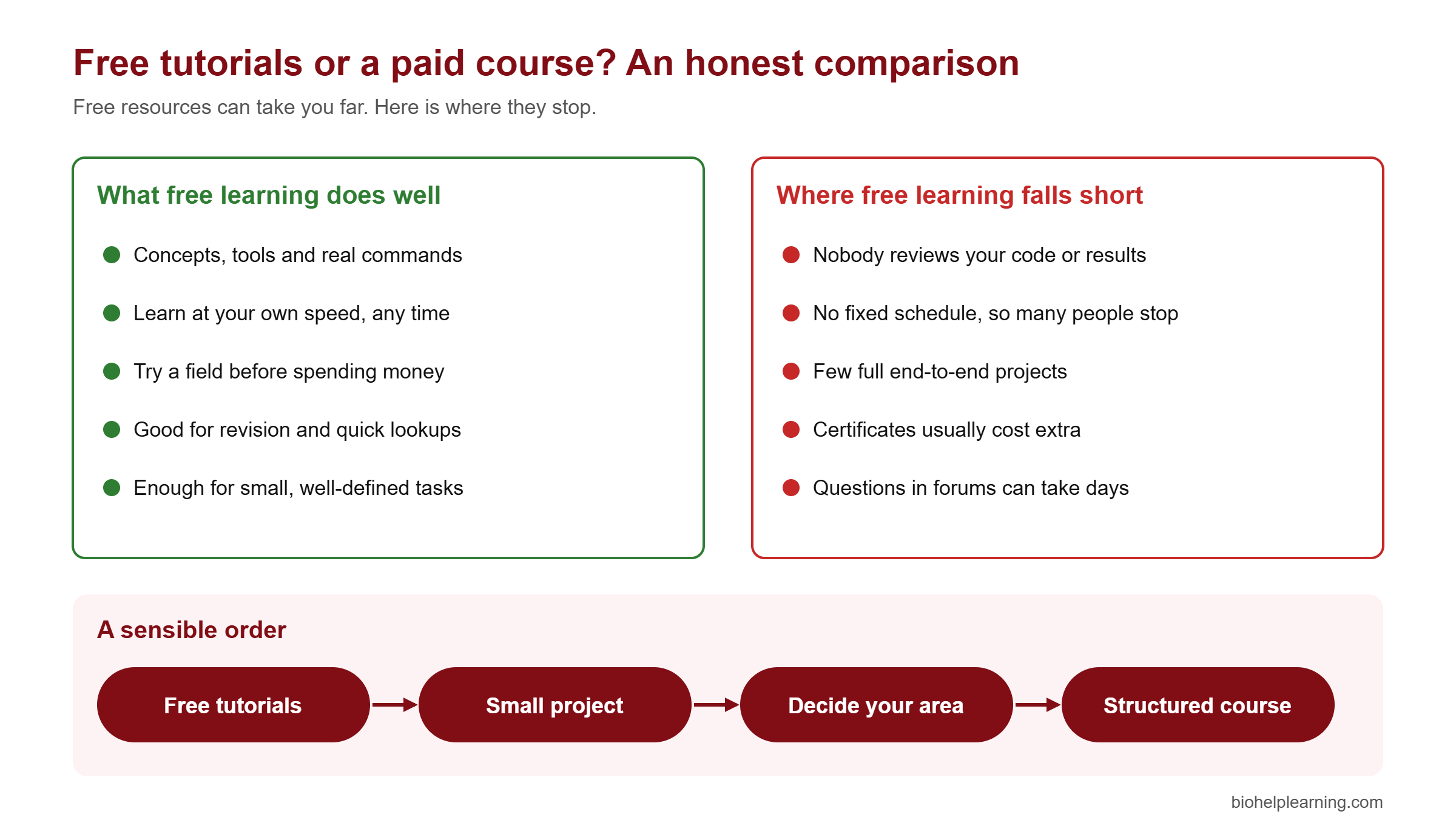
A sensible order is: learn the basics free, build one small project, decide which area interests you (genomics, transcriptomics, drug discovery, machine learning), and only then pay for a structured course in that area. That way you spend money on depth, not on things you could have learnt free.
If you reach that point, Bio Help Learning runs structured training with recorded lectures, assignments and certificates. Courses include RNA-seq data analysis, whole exome sequencing (WES) data analysis, AI and machine learning for bioinformatics and molecular dynamics simulation with GROMACS. Start with the free tutorials first. If they suit the way you learn, a full course will too.
Which skills to learn first for a bioinformatics career
Free courses are most useful when they lead somewhere. For most entry-level bioinformatics roles in India, such as bioinformatics analyst, NGS data analyst or research associate, the core skill stack looks like this:
- Linux command line: moving around files, using pipes, and writing small shell scripts.
- NGS basics: FASTQ files, quality control, alignment and the SAM/BAM format.
- One programming language: Python or R, enough to clean data and make plots.
- One full workflow: for example RNA-seq differential expression or variant calling, done end to end on public data.
- Reproducibility: Conda environments and Git, so others can rerun your work.
The free Bio Help Learning path follows this order. For a fuller picture of the field, read what bioinformatics is, its branches and scope, our step-by-step guide on how to become a bioinformatician, and the bioinformatics career scope in India. If you are weighing further study, see whether a PhD in bioinformatics is worth it in the AI era. Many analyst roles do not need a PhD, while research scientist roles usually do.
When you are ready to build something, our list of bioinformatics project ideas for students gives projects you can finish with free tools and public data. To see who hires, look at the top bioinformatics companies in India.
What free learning still cannot do for you
It is worth being clear about the limits, so you plan around them instead of being surprised.
- Free tutorials do not replace a project. Employers ask what you have analysed, not how many courses you finished. A GitHub repository with one complete, well-documented analysis beats a list of certificates.
- Your computer can be a bottleneck. Small tutorial datasets run on a normal laptop. Real whole-genome data needs far more memory and storage, which usually means a university server or cloud computing.
- Free content can go out of date. Tools change versions and options. Check the date on any tutorial, including old YouTube videos, and compare commands with the tool’s current documentation.
- Bio Help Learning’s free tutorials do not include one-to-one help. They are self-study material. For questions, the solutions, the “Go deeper” sections and the tool documentation are your first stop.
- The free section is still growing. Three tutorials are live today. Advanced topics such as single-cell analysis or structural bioinformatics are not yet covered in the free section, so for now you will need other resources or a course such as single-cell RNA-seq data analysis.
Frequently asked questions
Can I learn bioinformatics for free?
Yes. You can learn the foundations for free: Linux, NGS quality control, databases, BLAST and basic Python or R. Free tutorials from Bio Help Learning, NPTEL, EMBL-EBI, the Galaxy Training Network and Rosalind cover these well. What free resources rarely give you is feedback on your own work and guided end-to-end projects.
Which is the best free bioinformatics course for beginners?
Start with a hands-on path rather than theory alone. The free Bio Help Learning path (What is Bioinformatics, then Linux, then FastQC and MultiQC) gets you running real commands in the first week. Add EMBL-EBI’s Bioinformatics for the terrified for background and NPTEL’s IIT Madras course for theory.
Are there free bioinformatics courses with a certificate?
Partly. NPTEL courses are free to study, but the certificate needs a proctored exam, which usually costs about ₹1,000. EMBL-EBI and Rosalind do not offer certificates. Bio Help Learning’s tutorial certificate is part of the paid study material or membership and needs an approved project report.
Is Coursera bioinformatics still free to audit?
For most courses, no. Since August 2025, Coursera gives a free preview of the first module, and the rest of the course needs payment. Check each course page, because a few courses may still differ.
Do I need coding knowledge to start the free tutorials?
No. The Bio Help Learning tutorials start from zero and teach the Linux command line before anything else. You only need a computer. On Windows, the Linux tutorial videos show how to set up WSL2.
Where can I watch free bioinformatics video tutorials?
The Bio Help Learning YouTube channel has free chapter videos for the FastQC and Linux tutorials, plus recorded NGS webinars. NPTEL also publishes its full lecture videos for free.
How long does it take to learn bioinformatics for free?
With about one hour a day, you can finish the three live Bio Help Learning tutorials in about four weeks. Reaching job-ready level usually takes several months of steady practice, including at least one full project on public data.
Key takeaways
- “Free” can mean free content, free practice or a free certificate. Check all three before you choose a course.
- Bio Help Learning’s free tutorials are free to read, use real commands, and have three reading levels in every chapter. Free chapter videos are on YouTube.
- Three tutorials are live today (What is Bioinformatics, Linux, FastQC and MultiQC), and nine more are listed as coming soon.
- NPTEL, EMBL-EBI, the Galaxy Training Network, Rosalind and sandbox.bio are strong free resources to use alongside them. Coursera now offers only a free first-module preview for most courses.
- Type every command yourself, check your output, and do the exercises. One hour a day for four weeks gives you a real foundation.
- Free learning gives you the basics. A finished project, and later a structured course in one area, is what turns basics into a career.
References and further reading
- Bio Help Learning free tutorials: biohelplearning.com/tutorials
- Bio Help Learning YouTube channel: youtube.com/@biohelplearning1
- NPTEL, BioInformatics: Algorithms and Applications (IIT Madras): onlinecourses.nptel.ac.in
- EMBL-EBI, Bioinformatics for the terrified: ebi.ac.uk/training
- Galaxy Training Network: training.galaxyproject.org
- Hiltemann S. et al. (2023). Galaxy Training: a powerful framework for teaching! PLoS Computational Biology 19(1): e1010752. doi:10.1371/journal.pcbi.1010752
- Rosalind: rosalind.info
- sandbox.bio: sandbox.bio
- Coursera blog, Introducing Coursera’s new course preview experience (August 2025): blog.coursera.org