Biology today produces more data than any person can read. One sequencing run gives millions of short DNA reads. A single protein database holds far more entries than a student could open in a lifetime. Someone has to store this data, search it and turn it into answers.
That work is bioinformatics. This guide to bioinformatics for beginners explains what the field is, what data it uses, which free tools and databases you should learn first, and the order in which to learn them. It is written for BSc, MSc and PhD students from biotechnology, microbiology, zoology, botany, pharmacy and other life-science backgrounds who have never written a line of code.
You will get a six-step learning roadmap, a first project you can finish on a normal laptop, free courses you can start today, honest notes on careers, and a clear list of things bioinformatics cannot do. No prior programming is needed to follow it.
What Is Bioinformatics? A Simple Definition for Beginners
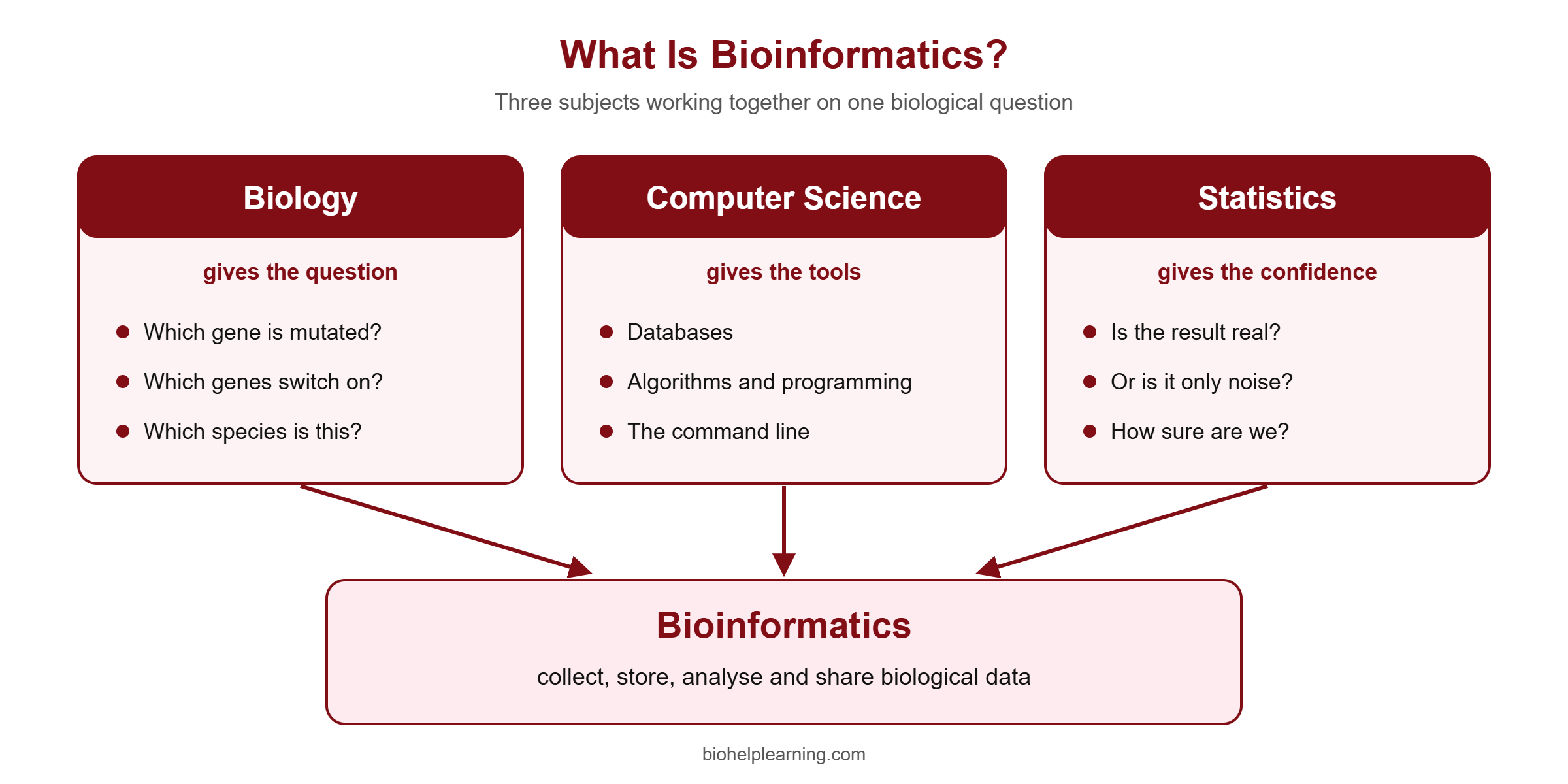
The National Human Genome Research Institute (NHGRI) describes bioinformatics as a scientific subdiscipline that uses computer technology to collect, store, analyse and share biological data, such as DNA and amino acid sequences and the notes (annotations) attached to them. In plain words: it is biology done with a computer instead of a pipette.
The same NHGRI entry makes a point every beginner should remember. Earlier, the hard part of genetics was getting the data. Sequencing technology has largely solved that. The hard part now is understanding the data, and because the datasets are so large, computer-based methods are the default way to do it.
Three subjects meet in bioinformatics:
- Biology gives the question. Which gene is mutated? Which genes switch on after drug treatment? Which species is in this sample?
- Computer science gives the tools: databases, algorithms, programming and the command line.
- Statistics tells you whether a result is real or only noise.
You do not need to be an expert in all three on day one. Most people enter from the biology side and add the computing in small steps. If you want a longer explanation of the branches of the field, read our article on what bioinformatics is, its branches and scope.
Bioinformatics vs computational biology
You will see both terms used for the same jobs. A useful working difference: bioinformatics is more about building and using tools, pipelines and databases to handle biological data, while computational biology is more about using models and mathematics to answer a biological question. In practice the two overlap heavily, and employers often use the words interchangeably. Do not let the label decide what you study.
Why Bioinformatics for Beginners Starts With Data, Not Code
Many beginners open a Python tutorial first, get stuck on loops, and give up. A better start is to understand the data. Once you know what a sequence file looks like and what question it can answer, the code has a purpose.
Here are the data types you will meet in your first months:
- DNA and RNA sequences – strings of A, T (or U), G and C. A plain sequence is usually stored in FASTA format: one header line starting with “>” and then the sequence.
- Raw sequencing reads – short pieces of sequence straight from the machine, stored in FASTQ format. FASTQ holds the sequence and a quality score for every base.
- Alignments – reads placed on a reference genome, stored as SAM or its compressed form BAM.
- Protein sequences – strings of amino acids, also stored as FASTA.
- 3D structures – the coordinates of every atom in a protein, DNA or RNA molecule.
Most beginner projects follow the same path from a biological sample to an answer. The figure below shows that path for next-generation sequencing (NGS), the technology that reads millions of DNA fragments in parallel.
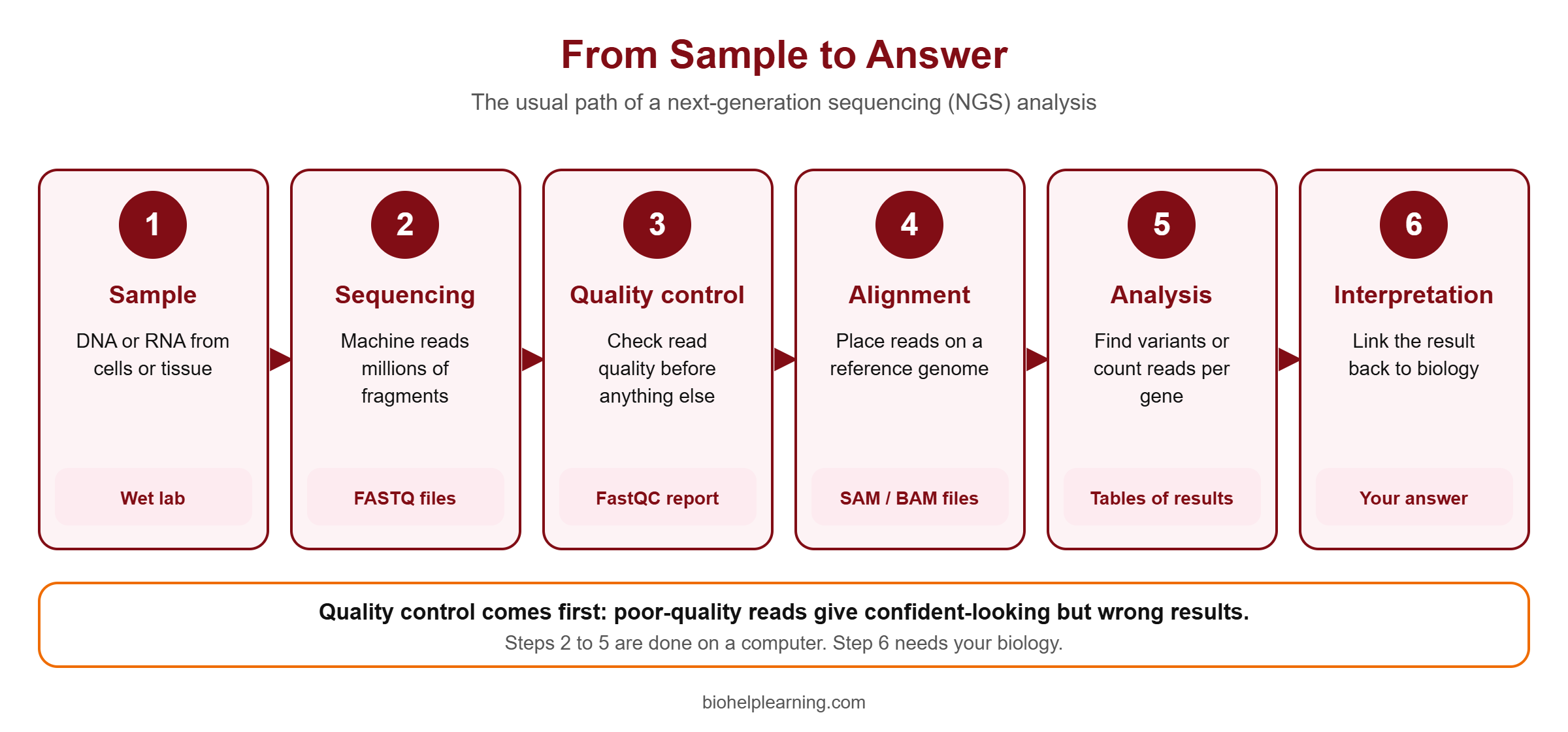
Notice that quality control comes before everything else. FastQC, a free tool from the Babraham Institute, runs quality checks on raw sequencing data and produces an HTML report with summary graphs and tables. It accepts FASTQ, SAM and BAM files. Running FastQC and reading its report is a very good first exercise. Our free tutorial on quality control of NGS reads with FastQC and MultiQC walks through it step by step.
The Databases Every Beginner Should Know
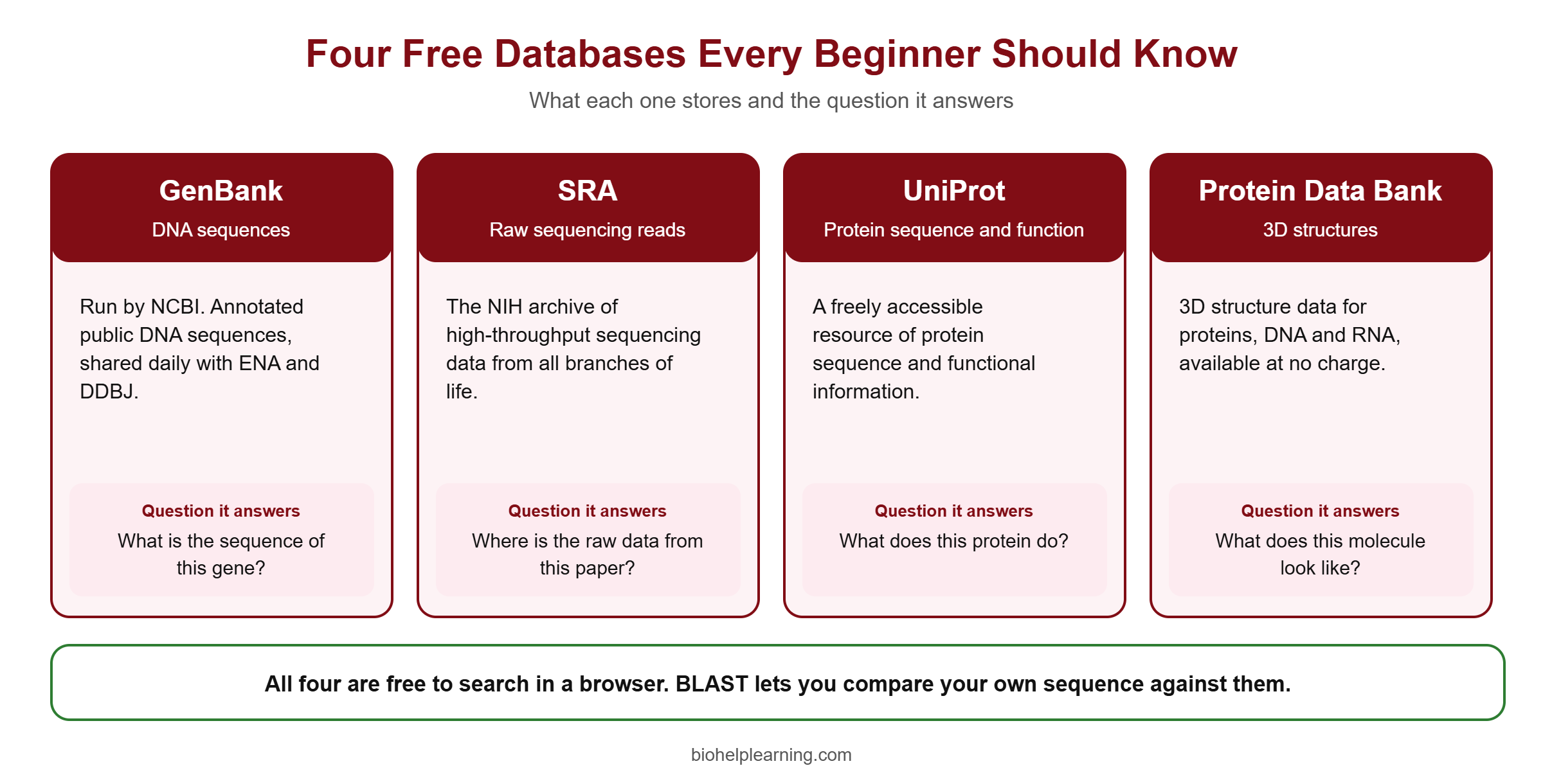
Before you analyse your own data, learn to find other people’s. Public databases are free, and searching them needs only a browser.
GenBank: DNA sequences
GenBank is the genetic sequence database of the US National Institutes of Health, run by the National Center for Biotechnology Information (NCBI). It is an annotated collection of publicly available DNA sequences. GenBank is one of three partners in the International Nucleotide Sequence Database Collaboration (INSDC). The other two are the European Nucleotide Archive (ENA) and the DNA Data Bank of Japan (DDBJ). The three exchange data every day, so a sequence submitted to one appears in all of them.
SRA: raw sequencing reads
The Sequence Read Archive (SRA) is the NIH archive of high-throughput sequencing data. It stores raw reads and alignment information from all branches of life, including metagenomic and environmental samples. When a paper says “data are available under accession number…”, the raw files usually sit here. This is where you will download practice data for your first NGS project.
UniProt: protein sequence and function
UniProt describes itself as a comprehensive and freely accessible resource of protein sequence and functional information. When you have a gene name and want to know what the protein does, where it sits in the cell and which domains it has, UniProt is the first place to look.
Protein Data Bank: 3D structures
The Protein Data Bank (PDB) holds 3D structure data for large biological molecules: proteins, DNA and RNA. RCSB PDB, the US data centre for the archive, provides the data at no charge and without limits on use. The archive is managed worldwide by the wwPDB partnership. If you move into drug discovery or docking later, every project will begin with a PDB entry.
BLAST: the first tool to learn
BLAST (Basic Local Alignment Search Tool) finds regions of local similarity between sequences. You paste in a sequence, BLAST compares it with a database and reports the closest matches together with a measure of their statistical significance. NCBI lists four main programs:
- blastn – nucleotide query against a nucleotide database.
- blastp – protein query against a protein database.
- blastx – translated nucleotide query against a protein database.
- tblastn – protein query against a translated nucleotide database.
BLAST answers the question students ask most often in the lab: “I have a sequence, what is it?” Learn to read the result table (identity, query cover and E-value, the number of matches you would expect by chance) before you learn anything harder.
Bioinformatics for Beginners: A Six-Step Learning Roadmap
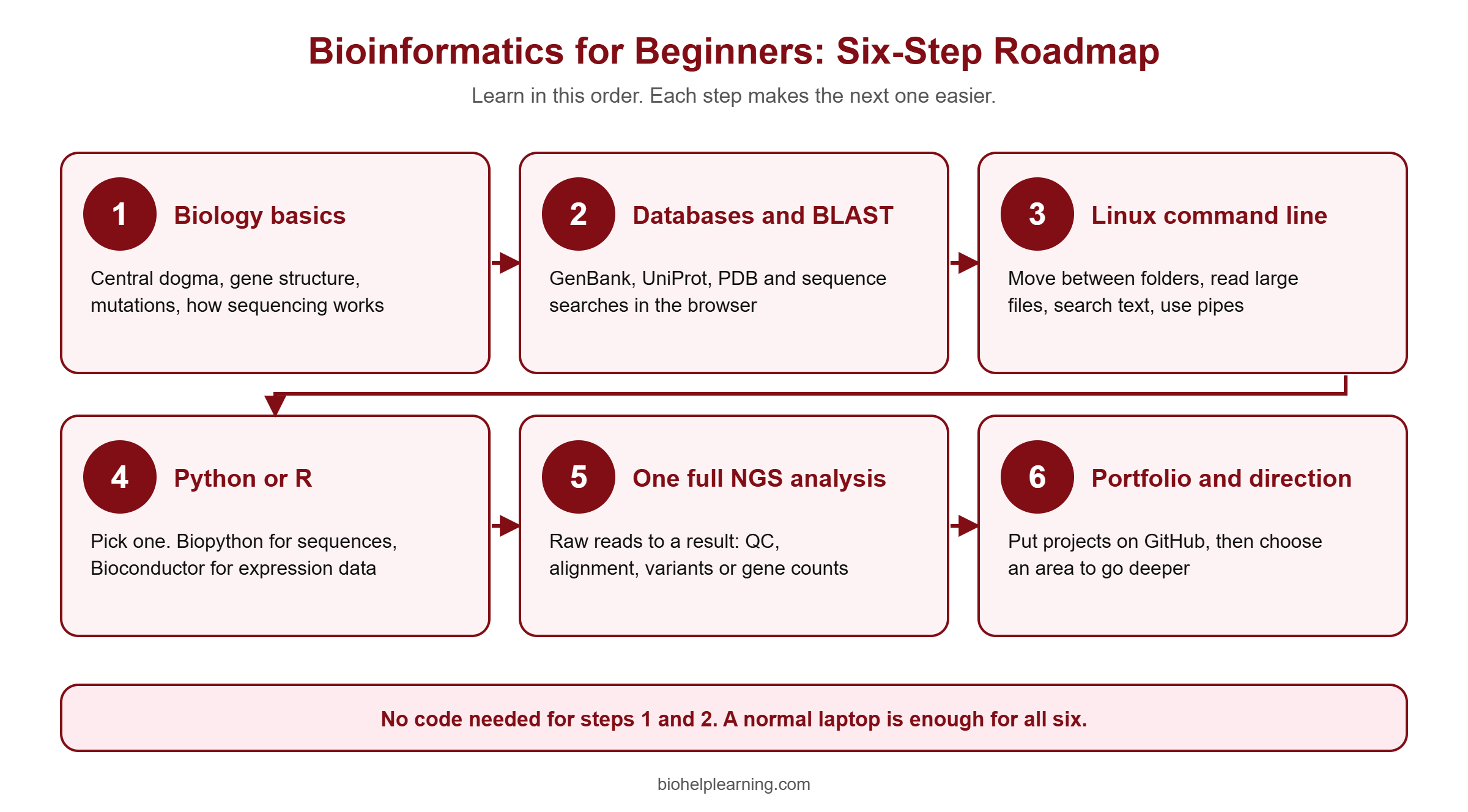
The order matters more than the speed. Each step below gives you something you can use immediately, and each one makes the next step easier.
Step 1: Revise the biology you will use every day
You need the central dogma (DNA to RNA to protein), gene structure (exons, introns, promoters), mutations and their types, and the basics of how sequencing works. If you are a life-science student, you already have most of this. Spend a few days revising it with data in mind: what would this look like as a file?
Step 2: Learn databases and BLAST in the browser
Pick one gene you know from your course, for example a gene linked to a disease you studied. Find its DNA record in GenBank, its protein in UniProt and a structure in the PDB. Run a blastn and a blastp search. Write down what each page told you. This costs nothing and needs no installation.
EMBL-EBI offers a free online tutorial for this stage called Bioinformatics for the terrified. It is aimed at bench researchers with little or no experience of bioinformatics tools, takes about one hour, and covers primary and secondary databases and the main types of data analysis. Note that EMBL-EBI does not issue certificates for its on-demand courses, so do it for the knowledge.
Step 3: Get comfortable with the Linux command line
Most bioinformatics tools have no buttons. You run them by typing commands in a terminal, and almost all servers used for analysis run Linux. You do not need to become a system administrator. You need to move between folders, look inside large files without opening them fully, search text, and chain commands together.
Start with a small set: pwd, ls, cd, mkdir, cp, mv, head, tail, less, wc, grep and the pipe symbol. With only these you can count the reads in a FASTQ file or pull every header out of a FASTA file. On Windows you can use the Windows Subsystem for Linux; on a Mac the built-in Terminal is enough. Our free tutorial on the Linux command line for bioinformatics covers these commands with examples.
Step 4: Learn one programming language, Python or R
Learn one first, not both. Choose by what you want to do.
- Python is a general-purpose language. It is good for handling sequence files, automating repeated tasks and, later, machine learning. Biopython is a free set of Python tools for biological computation, developed by an international team of volunteers under the Open Bioinformatics Foundation. It reads FASTA, FASTQ and GenBank files in a few lines.
- R is built for statistics and plots. Bioconductor is a project that develops and shares free, open-source software for analysing biological data, mostly as R packages. If your interest is gene expression (RNA-seq) analysis, R with Bioconductor is the usual choice.
Whichever you choose, practise on biological problems rather than generic exercises. Rosalind is a platform for learning bioinformatics by solving problems of increasing difficulty; answers are checked automatically, and it is designed both for biologists who want programming skills and for programmers new to biology. Our list of bioinformatics projects using Python gives more ideas once the basics are in place.
Step 5: Finish one complete NGS analysis
Now join everything. Take a small public dataset from the SRA and carry it from raw reads to a result: quality control, trimming, alignment to a reference, then either variant calling (finding differences from the reference) or counting reads per gene for expression analysis. The first complete run teaches more than ten half-finished tutorials.
If you want guided practice with real data, Bio Help Learning runs hands-on courses in RNA-seq data analysis and whole exome sequencing (WES) data analysis. You can also complete this step on your own with the free resources listed later in this guide.
Step 6: Build a small portfolio and choose a direction
Put your project on GitHub with a short README file: the question, the data, the commands, the result and what you would do differently. Two or three clean projects say more to a recruiter or PhD supervisor than a long list of certificates. Then choose a direction to go deeper: genomics, transcriptomics, structural bioinformatics and drug discovery, metagenomics, or machine learning for biology. For topic ideas, see bioinformatics project ideas for students.
Do You Need Coding? The No-Code Route and the Command-Line Route
Short answer: you can start without coding, but you cannot stay without it.
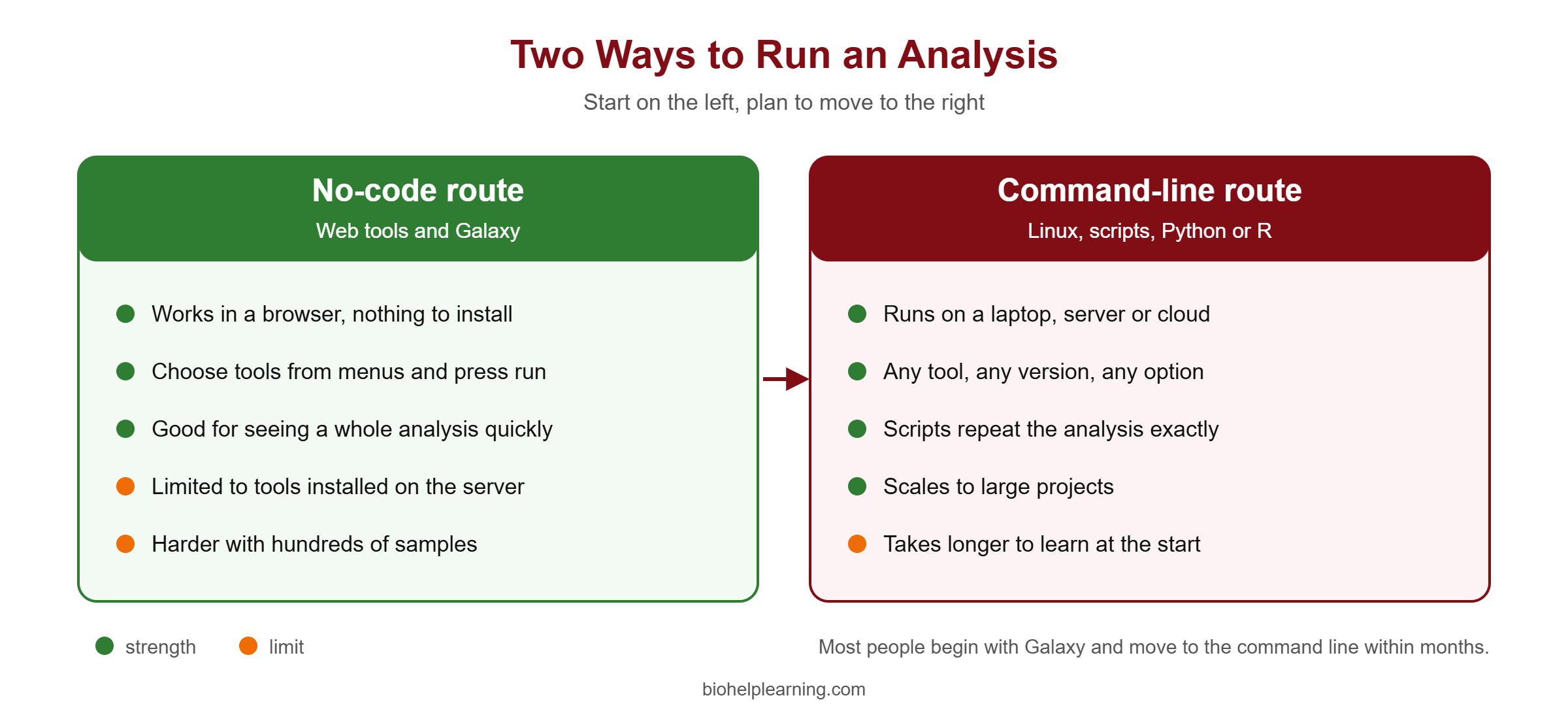
Galaxy is a web-based platform for scientific workflows. Its training material says the aim is to make computational biology accessible to research scientists who have no programming experience. You upload data, choose a tool from a menu, set the options and press run. The Galaxy Training Network has free tutorials for first-time users, including “A short introduction to Galaxy” and “Galaxy Basics for everyone”.
Galaxy is a good place to see a whole analysis before you learn the commands behind it. Its limits appear when you have hundreds of samples, need a tool that is not installed on the server, or must repeat the same analysis exactly for a paper. That is when the command line and scripts become necessary. Treat the no-code route as a way in, and plan to move to the command line within your first few months.
A First Project You Can Finish on a Laptop
Here is a project that needs no powerful computer and uses only the tools described above.
- Choose a question. Example: how similar is the same gene across five species?
- Collect the data. Search the gene in NCBI and download the protein sequences for five species in FASTA format.
- Compare. Run blastp with one sequence as the query and note the identity with the others.
- Look at function. Open the UniProt entries and compare the listed domains and functions.
- Look at structure. Check whether a structure exists in the PDB and view it in the browser.
- Automate one step. Write a short Python script with Biopython that reads your FASTA file and prints the length of each sequence.
- Write it up. One page: question, method, result, limits. Upload it to GitHub.
This small project covers databases, sequence comparison, a little code and scientific writing. It is also a good answer when an interviewer asks, “What have you done yourself?”
Common Mistakes Beginners Make
- Collecting courses instead of finishing projects. Watching is not the same as doing. After every tutorial, repeat it on a different dataset.
- Learning Python and R together. You will mix up the syntax and progress slowly in both.
- Skipping quality control. Poor-quality reads give confident-looking but wrong results.
- Running tools with default settings without reading what they mean. Every parameter is a decision about your data.
- Copying commands without understanding them. Type them yourself and change one option at a time to see what happens.
- Keeping no notes. Record every command and tool version. An analysis you cannot repeat is not a result.
- Waiting for a powerful computer. Database work, BLAST, Galaxy and small practice datasets all run on an ordinary laptop with an internet connection.
Careers After Learning Bioinformatics
Bioinformatics skills are used in academic research labs, genomics and diagnostics companies, pharmaceutical and biotech research teams, agricultural genomics and contract research organisations. The same skills also strengthen a wet-lab profile: a researcher who can analyse their own sequencing data does not have to wait for someone else.
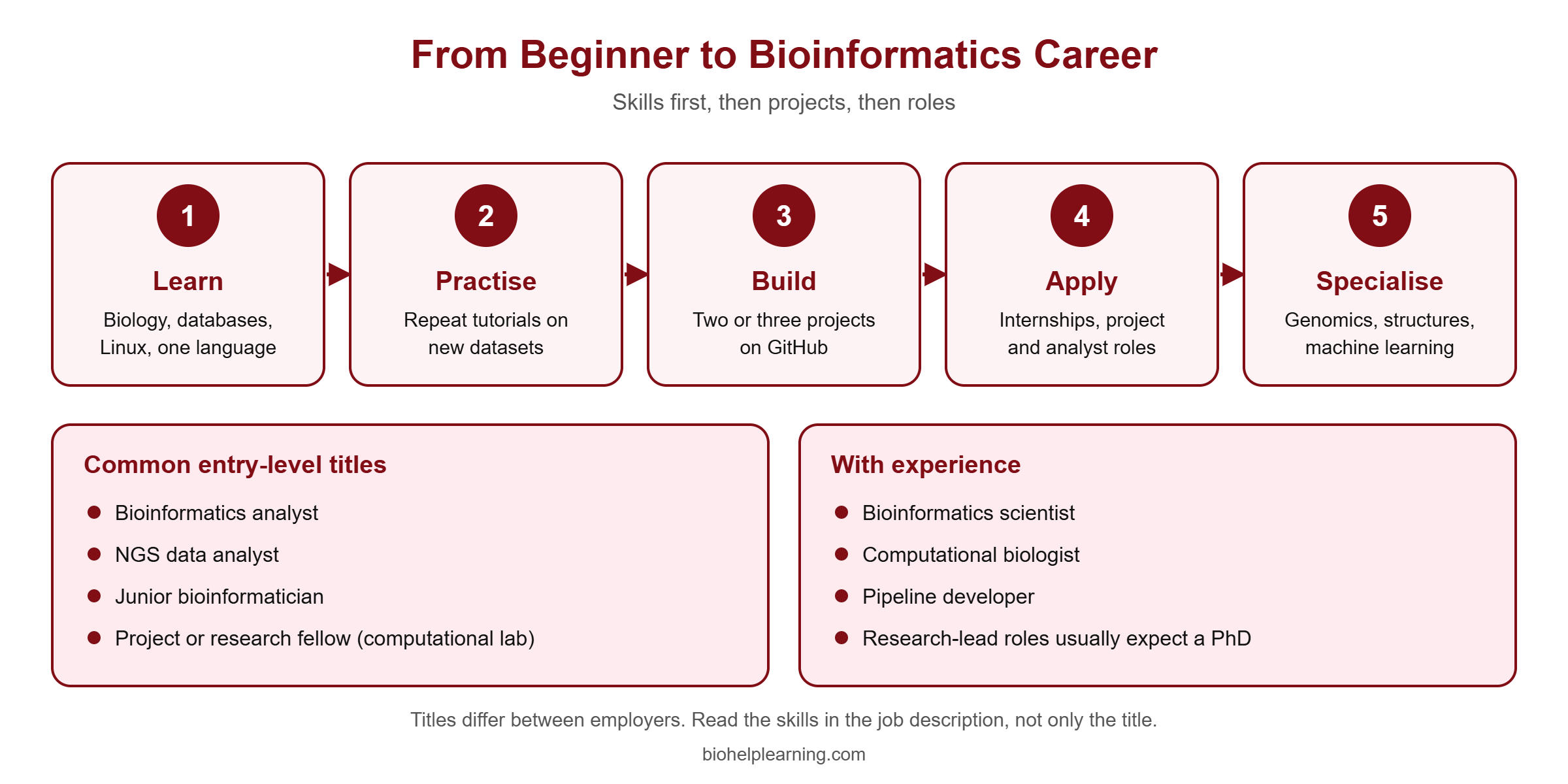
Typical entry-level titles include bioinformatics analyst, NGS data analyst, junior bioinformatician, and project or research fellow positions in computational labs. With experience people move to bioinformatics scientist, computational biologist or pipeline developer roles. Titles differ from one employer to the next, so read the skills in the job description instead of trusting the title.
Is a PhD necessary? Not for every role. Analyst and pipeline positions in industry are open to MSc and MTech graduates who can show working projects. Roles where you design the research question yourself, in academia or in industry research groups, usually expect a PhD. We discuss this in detail in is a PhD in bioinformatics worth it.
For a full career plan, read how to become a bioinformatician and bioinformatics career scope in India. To see who hires, we keep lists of the top bioinformatics companies in India and the top countries for a bioinformatics career. And if you are worried about automation, we cover that honestly in will AI replace bioinformaticians.
Free Courses and Resources to Start With
You can cover the whole beginner roadmap without paying for anything. Start with the free options and pay for a course only when you need guided practice, feedback or a fixed schedule.
Free university-level courses in India
NPTEL, the online learning platform of the IITs and IISc, offers “BioInformatics: Algorithms and Applications”, taught by Prof. Michael Gromiha of IIT Madras. NPTEL courses are delivered through the SWAYAM portal. Check the NPTEL site for the current run, the enrolment dates and the rules for the optional certification exam, because these change from one run to the next.
Free international resources
- EMBL-EBI Training – “Bioinformatics for the terrified”, a one-hour introduction to databases and analysis types. The materials are openly licensed (CC BY 4.0).
- Galaxy Training Network – step-by-step tutorials from first login to full NGS analyses, usable without programming.
- Rosalind – programming problems built on real molecular biology tasks, checked automatically. The site is community funded.
- NCBI, UniProt and RCSB PDB help pages – each database has its own tutorials, and they are the most reliable guide to that database.
- Tool documentation – the FastQC, Biopython and Bioconductor sites all carry beginner documentation written by the people who make the tools.
Bio Help Learning
We keep a longer list of free bioinformatics courses on this site. Our free tutorials cover individual tools one at a time. When you are ready to go beyond the basics, the course on AI and machine learning for bioinformatics is a natural next step after you are comfortable with Python.
What Bioinformatics Still Cannot Do
An honest beginner guide has to include the limits. Knowing them early will save you from over-trusting your results.
- It cannot rescue a bad experiment. If the samples were mixed up, the replicates are missing or the sequencing depth is too low, no software will repair it. Design comes before analysis.
- A prediction is not a proof. A predicted gene function, a docking score or a predicted damaging mutation is a hypothesis. It still needs confirmation at the bench.
- Tools always give an output. A program will produce a neat table even when the input was wrong. A result that looks clean is not automatically correct.
- Databases contain errors. Many annotations are assigned automatically by computer and have never been checked by a person. Treat an annotation as evidence, not as fact.
- Different tools can disagree. Two well-known programs can give different answers on the same data. Part of the job is understanding why.
- It does not replace biology. Without knowing the biology of your system you cannot tell an interesting result from an artefact. The strongest bioinformaticians are the ones who still think like biologists.
Frequently Asked Questions
Can I learn bioinformatics without a coding background?
Yes. Most people in the field started as biologists. Begin with databases, BLAST and Galaxy, which need no code, then add the Linux command line and one programming language step by step.
Should I learn Python or R first for bioinformatics?
Pick one based on your goal. Python suits file handling, automation and machine learning. R with Bioconductor suits statistics and gene expression analysis. Learn the second one later, when a project needs it.
How long does it take to learn bioinformatics?
There is no fixed number. It depends on how many hours you practise each week and on your background. Measure progress by finished projects, not by weeks. Being able to take one dataset from raw reads to a result on your own is a realistic first milestone.
Do I need a powerful computer to start?
No. Database searches, BLAST and Galaxy run in a browser, and small practice datasets work on a normal laptop. Large NGS analyses need a server or cloud computing, but you will not need that in the beginning.
Is bioinformatics a good option for biotechnology and life-science students?
It is a strong addition to a life-science degree, because sequencing data is now part of most research areas. It adds to your biology and does not replace it. Read real job descriptions before deciding how far to specialise.
Is mathematics required for bioinformatics?
Basic statistics is required: averages, variation, probability, p-values and multiple testing. Advanced mathematics is needed only in some specialisations such as algorithm development and machine learning.
What is the difference between bioinformatics and computational biology?
Bioinformatics leans towards tools, pipelines and databases for handling biological data. Computational biology leans towards models that answer a biological question. The two overlap, and many job adverts use the terms as if they were the same.
Are certificates important for getting a bioinformatics job?
They help less than you expect. Recruiters and supervisors want to see what you can do. A public GitHub repository with two or three complete, documented analyses is stronger proof than certificates alone.
Key Takeaways
- Bioinformatics uses computers to collect, store, analyse and share biological data. The difficult part today is interpreting the data, not producing it.
- Start with data and databases (GenBank, SRA, UniProt, PDB) and with BLAST. None of these need code.
- Follow the order: biology, databases, Linux, one language (Python or R), one complete NGS analysis, then a portfolio.
- Galaxy lets you run real analyses without programming, but long-term work needs the command line.
- The whole beginner path can be covered with free resources from NPTEL, EMBL-EBI, the Galaxy Training Network and Rosalind.
- Computational results are hypotheses. Quality control, good experimental design and lab validation still decide what is true.
References and Further Reading
- National Human Genome Research Institute – Talking Glossary: Bioinformatics
- NCBI – GenBank overview
- NCBI – Sequence Read Archive documentation
- NCBI – BLAST
- UniProt – About UniProt
- RCSB Protein Data Bank – About RCSB PDB
- Babraham Bioinformatics – FastQC
- Biopython – project home page
- Bioconductor – About Bioconductor
- EMBL-EBI Training – Bioinformatics for the terrified
- Galaxy Training Network – Introduction to Galaxy Analyses
- Rosalind – About Rosalind
- NPTEL – BioInformatics: Algorithms and Applications (IIT Madras)