
Bioinformatics File Formats Explained: FASTA, FASTQ, SAM/BAM, VCF, GTF and BED
Chapter 1 of 5: Bioinformatics file formats and how your data flows
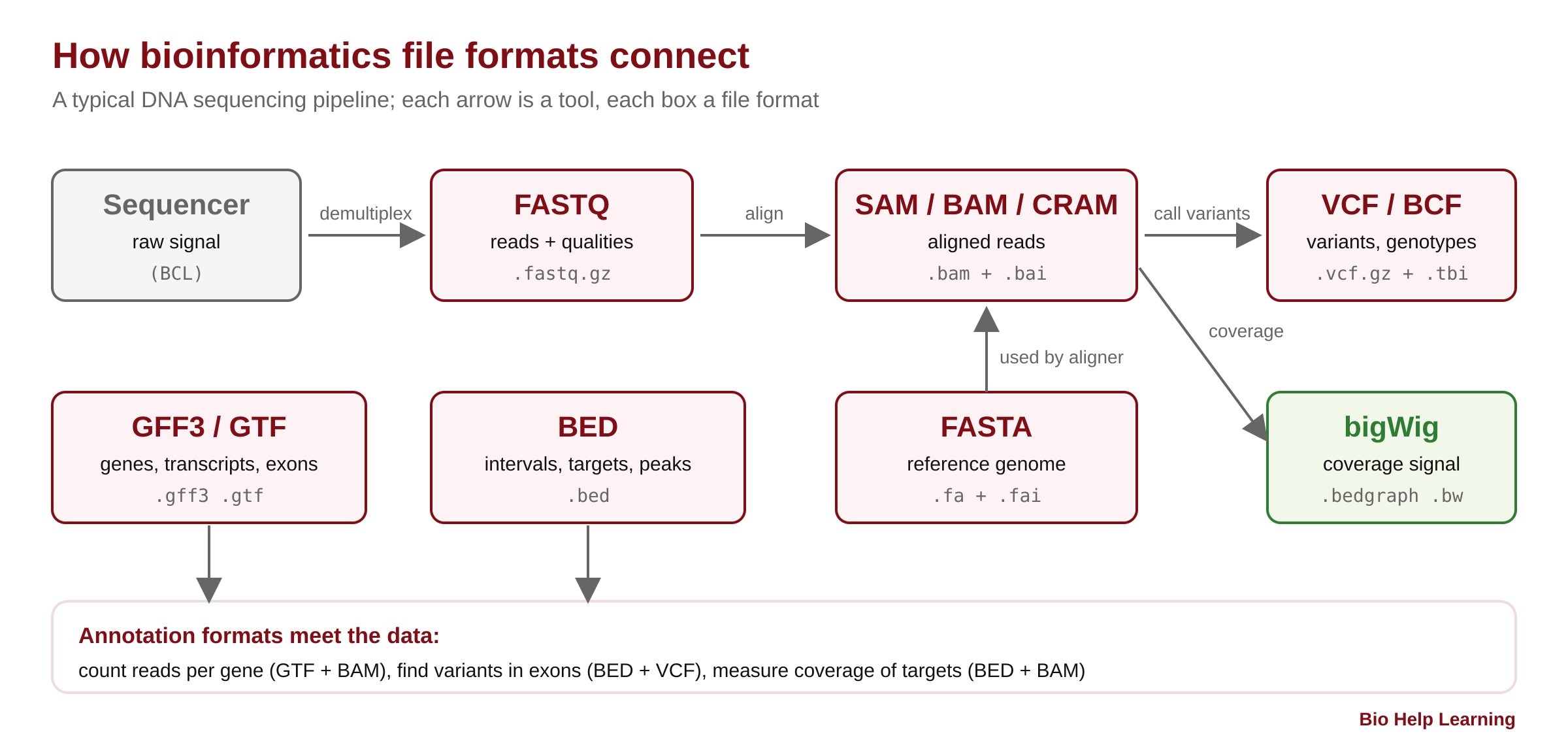
Every bioinformatics project is a chain of files. The sequencer writes FASTQ. The aligner reads FASTQ and a FASTA reference and writes SAM, BAM or CRAM. The variant caller writes VCF. Genes and exons come as GFF3 or GTF, and regions of interest as BED. If you understand these bioinformatics file formats, you can read any pipeline, check any result by eye, and fix most errors in minutes instead of days.
In this free step-by-step tutorial you will open each format line by line, on small real files that you create or download yourself. You will learn what every column means, which formats count from 0 and which from 1, why .gz is not always the same .gz, and how index files (.fai, .bai, .tbi) make huge files fast. You need only a terminal and the tools from the Conda and Bioconda tutorial.
Choose your reading path
Click a path to choose. With no choice made, the whole page is shown. ▸ Go deeper sections open on click; 🔬 Researcher notes boxes give published evidence, tool defaults and pitfalls. Your choice is remembered on this device.
Chapters:
- Bioinformatics file formats and how your data flows
- Practice files, FASTA and FASTQ
- Alignment formats: SAM, BAM and CRAM
- Variants and annotation: VCF, GFF3, GTF and BED
- Troubleshooting, practice and next steps
What you will learn
- Why file formats matter, and the three silent errors they cause (off-by-one, chromosome names, genome build)
- Text, binary and compressed files: plain gzip vs bgzip, and what index files do
- The difference between 1-based and 0-based coordinates, with a rule you will never forget
- FASTA and FASTQ: headers, wrapping, IUPAC codes, quality encoding and the
.faiindex - SAM/BAM/CRAM: the header, the 11 mandatory columns, FLAG bits, CIGAR strings, sorting, indexing and region queries
- VCF/BCF: meta-lines, the 8 fixed columns, genotypes, indel padding and tabix indexing
- GFF3, GTF and BED: gene models, the ID/Parent hierarchy, CDS phase, and safe conversion between them
- How to check, convert and troubleshoot files with samtools, bcftools, bedtools and seqkit
Why bioinformatics file formats matter
A file format is a contract. The tool that writes the file and the tool that reads it agree on what each line and each column means. When both sides follow the contract, pipelines just work. When they do not, you rarely get a crash. You get a wrong answer that looks right.
Three mistakes cause most of these silent errors:
- Off-by-one coordinates. BED counts from 0, VCF and GFF count from 1. Mix them up and every exon, SNP or primer is shifted by one base.
- Chromosome names. Ensembl writes
1, UCSC writeschr1. A BED file withchr1will match nothing in a BAM that uses1, and many tools just return zero results. - Genome build. Position 1,000,000 on GRCh37 (hg19) is a different base from position 1,000,000 on GRCh38 (hg38). The file looks fine; the biology is wrong.
This tutorial teaches you to spot all three by reading the files themselves.
Text, binary, compressed and indexed files
Some formats are plain text: you can open them with less, search them with grep and cut columns with cut. Others are binary: they are smaller and faster but need a tool to read them. Most large text files are also compressed.
| Format | Stores | Text or binary | Usual extension | Index file | Main tools |
|---|---|---|---|---|---|
| FASTA | Sequences (DNA, RNA, protein) | Text | .fa, .fasta, .fna, .faa | .fai | samtools faidx, seqkit |
| FASTQ | Reads + base qualities | Text (usually gzipped) | .fastq.gz, .fq.gz | (rarely) | FastQC, seqkit, fastp |
| SAM | Read alignments | Text | .sam | none | samtools |
| BAM | Read alignments | Binary (BGZF) | .bam | .bai or .csi | samtools, IGV |
| CRAM | Read alignments, reference-compressed | Binary | .cram | .crai | samtools |
| VCF | Variants and genotypes | Text (usually bgzipped) | .vcf.gz | .tbi or .csi | bcftools, GATK |
| BCF | Variants and genotypes | Binary (BGZF) | .bcf | .csi | bcftools |
| GFF3 / GTF | Gene models and features | Text | .gff3, .gtf | (tabix after sorting) | gffread, featureCounts, STAR |
| BED | Genomic intervals | Text | .bed | (tabix after sorting) | bedtools |
| bedGraph / bigWig | Signal along the genome (coverage) | Text / binary | .bedgraph, .bw | built into bigWig | deepTools, IGV, UCSC |
Two ideas explain the whole table. BGZF (block gzip, made by bgzip) is gzip cut into small independent blocks, so a tool can jump into the middle of the file. An index is a small side file that says which block holds which genomic region. Together they let IGV or samtools view file.bam chr7:55,000,000-55,300,000 answer in under a second, even for a 100 GB BAM.
▸ Go deeper: why plain gzip cannot be indexed
Normal gzip compresses the file as one long stream. To read byte 5,000,000,000 you must decompress everything before it, because the decompressor’s state depends on all earlier data.
BGZF, defined in the SAM/BAM specification, writes a series of gzip blocks, each holding at most 64 KiB of uncompressed data and each decompressible on its own. A virtual file offset combines two numbers: where the compressed block starts in the file, and how far into the uncompressed block the record starts. An index stores virtual offsets, so a reader seeks straight to the right block and decompresses only that block.
Every BGZF file is still a valid gzip file, so zcat and gunzip read it. The reverse is not true: a file made with plain gzip cannot be indexed by tabix or bcftools index. You will see the exact error in Chapter 5.
Coordinates: 1-based vs 0-based (the rule that saves you)
Every genomic format must say where a base is. There are two systems.
- 1-based, closed
[start, end]: the first base is 1, and both start and end are included. Used by SAM, VCF, GFF3/GTF and by region strings you type, such aschr1:100-200. - 0-based, half-open
[start, end): the first base is 0, start is included, end is excluded. Used by BED, and inside the binary BAM and BCF files (tools convert for you when they print).
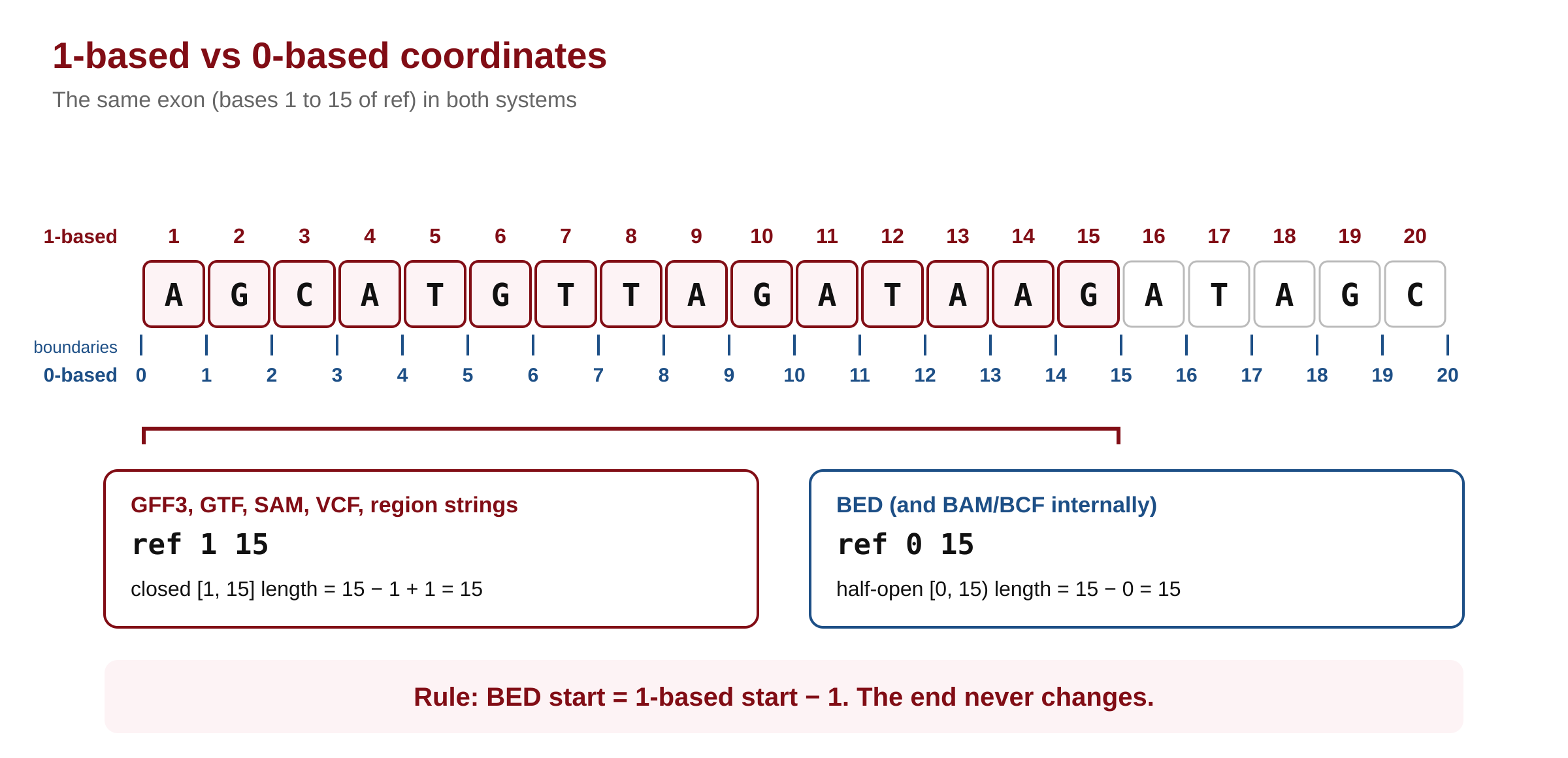
The rule: to go from 1-based to BED, subtract 1 from the start and keep the end. To go back, add 1 to the start. The end never changes. The length is end − start + 1 in 1-based coordinates and simply end − start in BED.
Worked example. In this tutorial’s practice gene, exon 1 covers bases 1 to 15 of a sequence called ref. In GFF3 that is ref … 1 15. In BED it is ref 0 15. Both describe exactly 15 bases: 15 − 1 + 1 = 15 and 15 − 0 = 15.
▸ Go deeper: why would anyone count from zero?
Half-open intervals make arithmetic clean. The length is end − start. Two intervals touch without overlap when the first’s end equals the second’s start ([0,15) and [15,40)). An empty interval, such as the point where an insertion happens, is simply start = end. Programming languages index arrays from 0, so a BED start can be used directly as a string index: in Python, seq[0:15] returns exactly the first 15 bases.
1-based closed intervals match how biologists talk (“the first base”, “exon 2 spans 1,201–1,500”), which is why human-facing formats such as VCF and GFF use them.
# Converting coordinates (pseudo-code)
bed_start = one_based_start - 1
bed_end   = one_based_end          # unchanged
length    = bed_end - bed_start    # = one_based_end - one_based_start + 1

# A single 1-based position p (for example a SNP in a VCF) as BED:
bed_line  = chrom, p - 1, p
🔬 Researcher notes: who uses which system
The SAM/BAM specification (section 1.1, “Terminologies and concepts”) states it directly: SAM, VCF, GFF and Wiggle use the 1-based coordinate system; BAM, BCFv2, BED and PSL use the 0-based coordinate system. The UCSC Genome Browser stores BED-style 0-based starts internally but displays 1-based positions, which is why a position copied from the browser into a BED file is often off by one.
Zero-length features follow each format’s own rule. In BED, chromStart = chromEnd marks a point between two bases, such as an insertion site (BED specification v1, 2022). In GFF3, a zero-length feature has start = end and the site is to the right of that base. In VCF, insertions and deletions carry a padding base so that no allele is empty (Chapter 4).
When you report regions in a paper or supplement, say which system you used (for example “coordinates are 1-based, inclusive, GRCh38”). Reviewers and readers cannot guess.
Chromosome names and genome builds
Every file that holds positions also holds sequence names: @SQ SN: lines in SAM, ##contig lines in VCF, the first column of BED and GFF. All files in one analysis must use the same names and the same lengths, taken from the same reference FASTA. Later in this tutorial you will compare names across files with one command.
🔬 Researcher notes: naming conventions and the reference you report
Ensembl and GENCODE GTFs for human use chr1 (GENCODE) or 1 (Ensembl), and the mitochondrial genome is chrM in UCSC-style files but MT in Ensembl files. The SAM specification also allows an M5 tag (MD5 checksum of the sequence) and AS (assembly) on @SQ lines; when present, comparing M5 values is the most reliable way to prove two files used the same reference.
For human data, many pipelines use an “analysis set” FASTA (primary assembly plus, in some sets, the decoy and EBV sequences, with ALT contigs handled specially). Report the exact FASTA file, its source and its release, not just “hg38”.
Quick check: a SNP is at VCF position 1,000. What are its BED start and end?
Start 999, end 1000. Subtract 1 from the start, keep the end. The BED interval [999, 1000) holds exactly one base: the base at 1-based position 1,000.