
Bioinformatics File Formats Explained: FASTA, FASTQ, SAM/BAM, VCF, GTF and BED
Chapter 3 of 5: Alignment formats – SAM, BAM and CRAM
SAM, BAM and CRAM: alignment file formats
After alignment, each read gets a position on the reference. SAM (Sequence Alignment/Map) stores this as text. BAM is the same information in compressed binary form, and CRAM compresses further by storing only the differences from the reference (Li et al., 2009; SAM specification). Learn SAM, and you can read all three.
Step 3: Look at the header
A SAM file has a header (lines starting with @) and an alignment section (one line per alignment). Print just the header with -H:
samtools view -H toy.samThe @SQ lines list every reference sequence with its name (SN) and length (LN). They match toy.fa.fai exactly, which is what you want. The @PG line was added by samtools itself: tools record each program run in the header, so a BAM carries its own history.
| Header line | Meaning | Important tags |
|---|---|---|
@HD | File-level information (at most one, first line) | VN format version, SO sort order: unknown, unsorted, queryname, coordinate |
@SQ | One reference sequence | SN name, LN length (both required), M5 MD5, AS assembly |
@RG | Read group: reads from one library on one lane | ID, SM sample, LB library, PL platform, PU platform unit |
@PG | A program that processed the file | ID, PN name, VN version, CL command line |
@CO | Free-text comment | (none) |
Step 4: The 11 mandatory columns
Every alignment line has at least 11 tab-separated columns, always in this order. Optional tags follow from column 12.
samtools view toy.sam | cut -f 1-6 | head -n 6| Col | Field | Meaning | Example (r001, first line) |
|---|---|---|---|
| 1 | QNAME | Read (template) name; mates share it | r001 |
| 2 | FLAG | Bitwise flags: paired, mapped, strand, first/second, … | 163 |
| 3 | RNAME | Reference sequence name (* if unmapped) | ref |
| 4 | POS | 1-based leftmost position of the alignment | 7 |
| 5 | MAPQ | Mapping quality: −10 log10 P(position is wrong); 255 = not available | 30 |
| 6 | CIGAR | How the read aligns: matches, insertions, deletions, clips | 8M4I4M1D3M |
| 7 | RNEXT | Mate’s reference (= same as RNAME, * none) | = |
| 8 | PNEXT | Mate’s position | 37 |
| 9 | TLEN | Observed template (fragment) length; + for leftmost mate, − for rightmost | 39 |
| 10 | SEQ | Read sequence, on the forward strand of the reference | TTAGATAAAGAGGATACTG |
| 11 | QUAL | Base qualities, Phred+33 (* if not stored) | * |
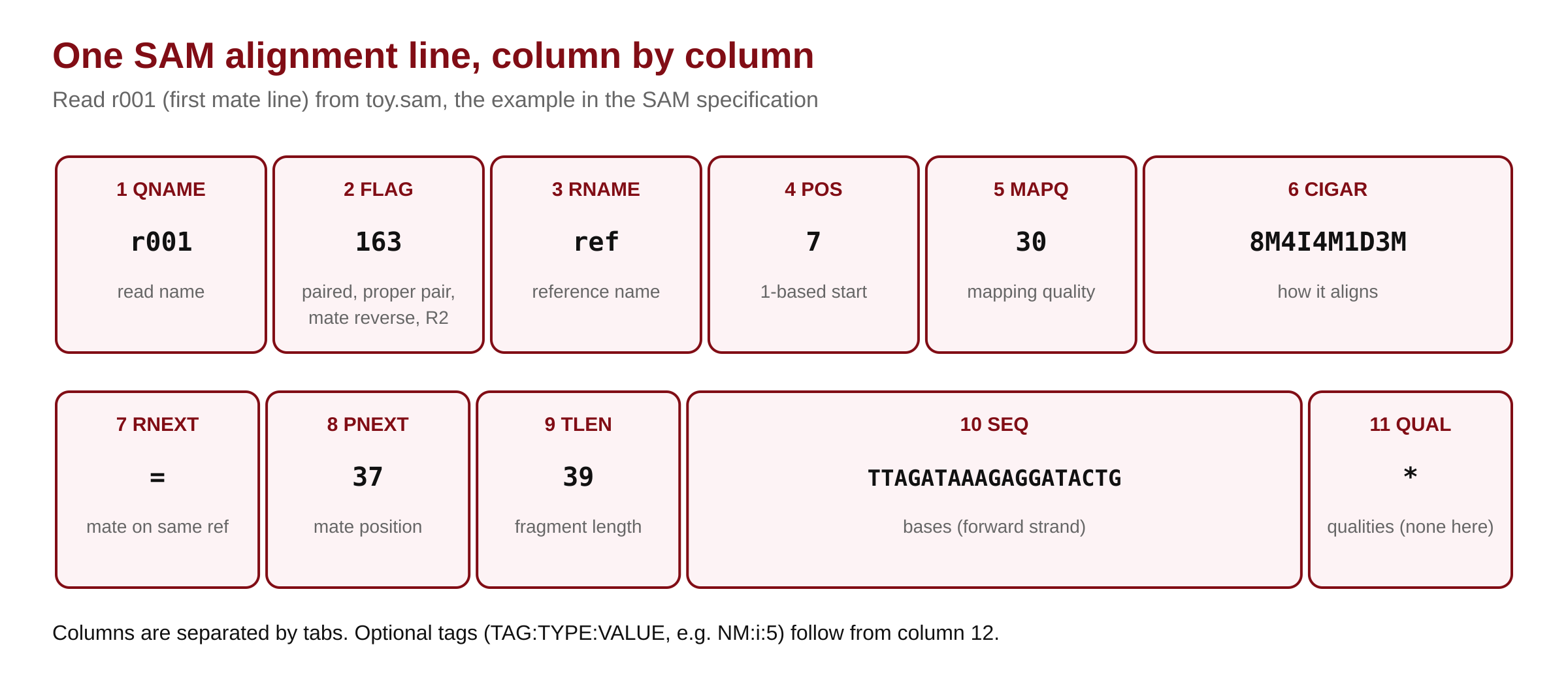
Note column 10: for reads that aligned to the reverse strand, SAM stores the reverse complement of the read, so that SEQ always matches the forward strand of the reference. The FLAG tells you which reads were flipped.
Step 5: Decode the FLAG
FLAG is a sum of powers of two. Each bit answers one yes/no question. Let samtools decode it:
samtools flags 163
samtools flags 83
samtools flags 4| Bit (decimal) | Hex | samtools name | Meaning |
|---|---|---|---|
| 1 | 0x1 | PAIRED | Read is part of a pair (paired-end sequencing) |
| 2 | 0x2 | PROPER_PAIR | Both mates aligned as the aligner expects |
| 4 | 0x4 | UNMAP | This read is unmapped |
| 8 | 0x8 | MUNMAP | The mate is unmapped |
| 16 | 0x10 | REVERSE | SEQ is reverse-complemented (read on the − strand) |
| 32 | 0x20 | MREVERSE | The mate is on the − strand |
| 64 | 0x40 | READ1 | First read of the pair (R1) |
| 128 | 0x80 | READ2 | Second read of the pair (R2) |
| 256 | 0x100 | SECONDARY | Secondary (alternative) alignment |
| 512 | 0x200 | QCFAIL | Failed platform/vendor quality checks |
| 1024 | 0x400 | DUP | PCR or optical duplicate |
| 2048 | 0x800 | SUPPLEMENTARY | Supplementary (chimeric/split) alignment |
So 163 = 128 + 32 + 2 + 1: paired, properly paired, mate on the reverse strand, and this is R2. Its mate, 83 = 64 + 16 + 2 + 1, is R1 on the reverse strand. Use -f to keep reads that have bits set, and -F to drop reads that have them:
samtools view -c toy.sam
samtools view -c -f 16 toy.sam
samtools view -c -F 0x904 toy.sam-c: count instead of printing.-f 16: only reads on the reverse strand.-F 0x904: drop unmapped (0x4), secondary (0x100) and supplementary (0x800) records, leaving one primary, mapped line per read. This is the usual way to count mapped reads.
▸ Go deeper: testing bits in code
A bit is set when FLAG AND bit is not zero. This works in any language, and in awk you can use integer division and modulo when bitwise operators are missing.
# Is a read on the reverse strand? (pseudo-code)
is_reverse = (flag & 16) != 0
is_primary = (flag & 0x900) == 0      # neither secondary nor supplementary
is_mapped  = (flag & 4) == 0

# awk without bitwise operators: bit b is set if int(flag / b) % 2 == 1
awk '!/^@/ && int($2/16)%2==1' toy.sam    # reverse-strand records
The specification requires exactly one primary line per read, the line where FLAG & 0x900 == 0. Counting only primary lines therefore counts each read once.
Step 6: Read a CIGAR string
CIGAR is a list of length + operation pairs. Read r001 has 8M4I4M1D3M: 8 aligned bases, 4 inserted bases, 4 aligned, 1 deleted, 3 aligned.
| Op | Meaning | Uses read bases? | Uses reference bases? |
|---|---|---|---|
M | Alignment match (base can match or mismatch) | yes | yes |
I | Insertion in the read, not in the reference | yes | no |
D | Deletion: reference bases missing from the read | no | yes |
N | Skipped reference region (an intron in RNA-seq) | no | yes |
S | Soft clip: bases kept in SEQ but not aligned | yes | no |
H | Hard clip: bases removed from SEQ | no | no |
P | Padding (silent deletion from a padded reference) | no | no |
= / X | Sequence match / mismatch (more specific than M) | yes | yes |
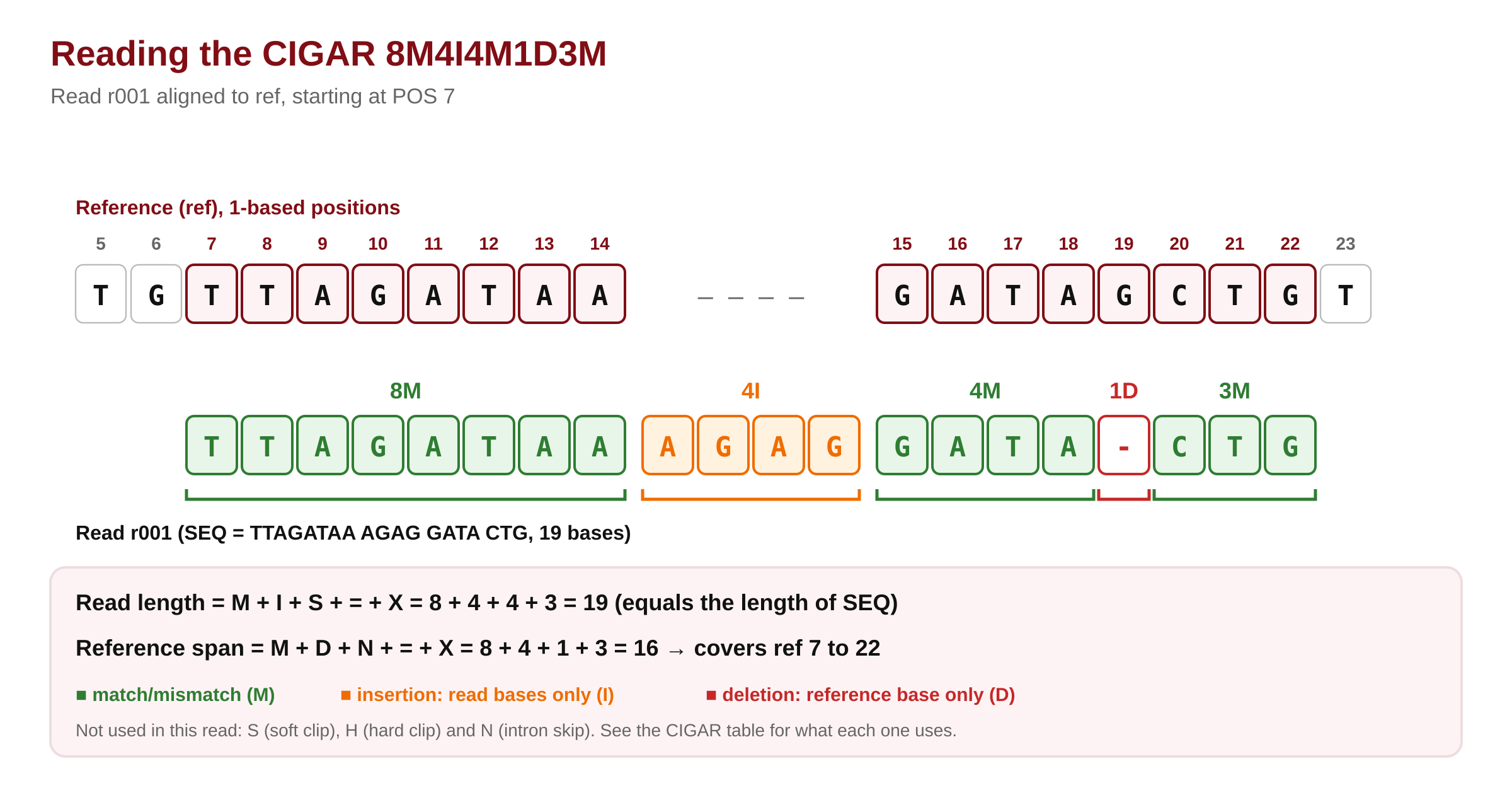
Two sums check any alignment. Read length = sum of M I S = X = 8 + 4 + 4 + 3 = 19, the length of SEQ. Reference span = sum of M D N = X = 8 + 4 + 1 + 3 = 16, so r001 covers reference bases 7 to 22. The spliced read r004 (6M14N1I5M) jumps over 14 reference bases with N, exactly as RNA-seq reads jump over introns.
▸ Go deeper: computing the alignment end and the MD tag
# Reference end of an alignment (pseudo-code)
end = POS - 1
for (length, op) in parse(CIGAR):
    if op in 'MDN=X':
        end += length
# end is 1-based and inclusive: r001 -> 7 - 1 + 16 = 22
The optional NM tag is the edit distance to the reference (mismatches + inserted + deleted bases), and MD spells out the mismatching and deleted reference bases. For r001, samtools computes MD:Z:12^G3 and NM:i:5: 12 matching bases, the deleted reference base G, then 3 matches; 4 inserted + 1 deleted = 5 edits. With MD you can rebuild the reference under a read without the FASTA.
🔬 Researcher notes: MAPQ, TLEN and tags are aligner-specific
The specification defines MAPQ as −10 log10 P(mapping position is wrong), but each aligner estimates that probability its own way. BWA-MEM reports 0–60, Bowtie 2 uses a different scale, and STAR uses 255 for unique and 3, 1 or 0 for multi-mapped reads. A MAPQ ≥ 20 or ≥ 30 filter is therefore a convention for one aligner, not a universal threshold: state the aligner and filter together in your Methods.
The specification also notes that there is no clear consensus on how TLEN’s template start and end are defined, so values can differ by a few bases between tools. Use samtools stats insert-size output or Picard’s CollectInsertSizeMetrics rather than raw TLEN when you report fragment sizes.
Standard optional tags are listed in the separate SAMtags specification: for example AS (alignment score), NM (edit distance), MD, NH (number of reported alignments) and RG (read group). Tags starting with X, Y or Z, or with a lowercase letter, are reserved for local use, so their meaning depends on the tool that wrote them.
Step 7: Convert to BAM, sort and index
Almost every downstream tool wants a coordinate-sorted, indexed BAM. One command sorts and writes BAM, another builds the index:
samtools sort -o toy.bam toy.sam
samtools index toy.bam
ls -l toy.sam toy.bam toy.bam.bai
samtools view toy.bam ref:30-40 | cut -f 1-6
samtools sort -o toy.bam: sorts by reference and position and writes BAM (the format comes from the.bamname).samtools index: writestoy.bam.bai. The BAM must be coordinate-sorted first.samtools view toy.bam ref:30-40: prints only alignments that overlap bases 30–40 ofref(1-based region). This needs the index.
Notice r004: it starts at 16, but its 14N carries it past position 30, so it overlaps the region. Region queries use the full alignment span, not just POS.
samtools flagstat toy.bam
samtools idxstats toy.bamidxstats reads the index and prints, per sequence: name, length, mapped reads and unmapped reads. On a real BAM this gives reads per chromosome in a second, which is a quick sex check (chrY) or contamination check (unexpected contigs).
🔬 Researcher notes: read groups and duplicates
Variant callers and duplicate markers group reads by the @RG header line and the RG:Z: tag on each read. GATK tools such as BaseRecalibrator and HaplotypeCaller require read groups, and the SM tag decides the sample name in the VCF. Add them at alignment (for example bwa mem -R '@RG\tID:lane1\tSM:sample1\tPL:ILLUMINA') or later with samtools addreplacerg. Use one ID per lane and library, so duplicate marking and recalibration work per run.
Duplicate markers (Picard MarkDuplicates, samtools markdup) normally set FLAG bit 0x400 rather than delete reads. Downstream callers skip flagged reads, and samtools flagstat reports them, so the original data stay recoverable. Report the duplicate rate and whether duplicates were marked or removed.
Step 8: CRAM, the smallest alignment format
CRAM stores each read as differences from the reference, so it needs the same reference FASTA to write and to read.
samtools view -C -T toy.fa -o toy.cram toy.bam
samtools index toy.cram
samtools view -T toy.fa toy.cram | head -n 1-C: write CRAM.-T toy.fa: the reference used for compression and decompression.
Our toy CRAM (1,512 bytes) is actually bigger than the BAM (547 bytes), because CRAM has a fixed container overhead. Compression only pays off at real scale. On a simulated set of 100,000 read pairs (150 bp) against a 200 kb genome, we measured:
| File | Size | vs SAM |
|---|---|---|
| SAM (text) | 84.9 MB | 1× |
| BAM | 23.9 MB | 3.6× smaller |
| CRAM 3.1 (lossless) | 15.6 MB | 5.4× smaller |
| For comparison: R1 FASTQ / R1 FASTQ.gz | 31.6 MB / 14.6 MB |
(Your numbers depend on your data.) Real sequencer data, with binned qualities and many identical bases, usually compresses better than our simulation, which used noisy, unbinned qualities.
🔬 Researcher notes: BAI limits, CSI, and keeping CRAM readable
The BAI index divides each reference into bins of 512 Mbp down to 16 kbp, plus a linear index of 16,384 bp windows (SAM specification, section 5). Because of this, BAI cannot index sequences longer than 229 − 1 bases (about 537 Mb). Some plant and amphibian chromosomes are longer; for them use the CSI index (samtools index -c), which supports the full SAM coordinate range.
Every BGZF file should end with a fixed empty “EOF marker” block. Its absence means the file was cut short, for example by a full disk or a failed copy. samtools quickcheck -v *.bam tests the header and the EOF marker of many files in seconds, and should be run before deleting any FASTQ.
CRAM’s reference-based compression (Hsi-Yang Fritz et al., 2011) means a CRAM is only as durable as access to its exact reference. Keep the FASTA with the data, record its MD5s (samtools writes M5 tags into CRAM headers), and note that if a reference cannot be found locally, htslib may try to fetch it by MD5 from the EBI reference server unless you set REF_PATH/REF_CACHE. For long-term archives, many centres (and the EBI) store CRAM.
Methods template: “Reads were aligned to GRCh38 (Ensembl release 115 primary assembly) with <aligner, version>. Alignments were coordinate-sorted and indexed with samtools <version> (Danecek et al., 2021) and stored as CRAM 3.1.”
Quick check: a read has FLAG 99 and CIGAR 5S95M. Is it R1 or R2, which strand, and how many reference bases does it cover?
99 = 64 + 32 + 2 + 1: paired, properly paired, mate reversed, R1, and bit 16 is not set, so the read is on the forward strand. Soft-clipped bases do not use the reference, so it covers 95 reference bases (read length is 100).
Full access + Certificate
- Every file of the study material, yours to keep
- Every chapter, video and solution of this tutorial
- Copy the code with one click
- Certificate with QR verification after your project report is approved