
Bioinformatics File Formats Explained: FASTA, FASTQ, SAM/BAM, VCF, GTF and BED
Chapter 2 of 5: Practice files, FASTA and FASTQ
What you need
- A terminal: Linux, macOS, or Windows with WSL2 and Ubuntu (see the Linux Command Line for Bioinformatics tutorial).
- Miniforge (conda) with the conda-forge and bioconda channels (see the Conda and Bioconda tutorial).
- About 200 MB of free disk space for the tools. The practice files are tiny (a few kilobytes).
- Basic commands:
cd,ls,cat,head,grep,cutand pipes (|).
Step 1: Install the tools in a new environment
We use four tools. samtools and bcftools read and write SAM/BAM/CRAM and VCF/BCF. htslib gives you bgzip and tabix. bedtools works with intervals, and seqkit with FASTA/FASTQ.
conda create -n formats -c conda-forge -c bioconda samtools bcftools htslib bedtools seqkit
conda activate formats
samtools --version | head -n 1
bcftools --version | head -n 1
bedtools --version
seqkit version
conda create -n formats: makes a new environment calledformats.-c conda-forge -c bioconda: the channels to search, conda-forge first.conda activate formats: switches to it. Do this in every new terminal.--version/version: prints each tool’s version, so you can write it in your Methods.
Step 2: Create the project folder and get the practice files
Our main practice files are the official example from the SAM specification, kept in the samtools GitHub repository: a tiny reference with two sequences (toy.fa) and 12 aligned reads (toy.sam). They are small enough to read every line, yet they contain insertions, deletions, clipping, a spliced read and a read pair.
mkdir -p ~/bhl-formats
cd ~/bhl-formats
wget https://raw.githubusercontent.com/samtools/samtools/develop/examples/toy.fa
wget https://raw.githubusercontent.com/samtools/samtools/develop/examples/toy.sam
ls -l
mkdir -p ~/bhl-formats: makes the project folder in your home folder (-p= no error if it already exists).wget URL: downloads a file into the current folder. On macOS, usecurl -O URLifwgetis missing.
FASTA: sequences with a name
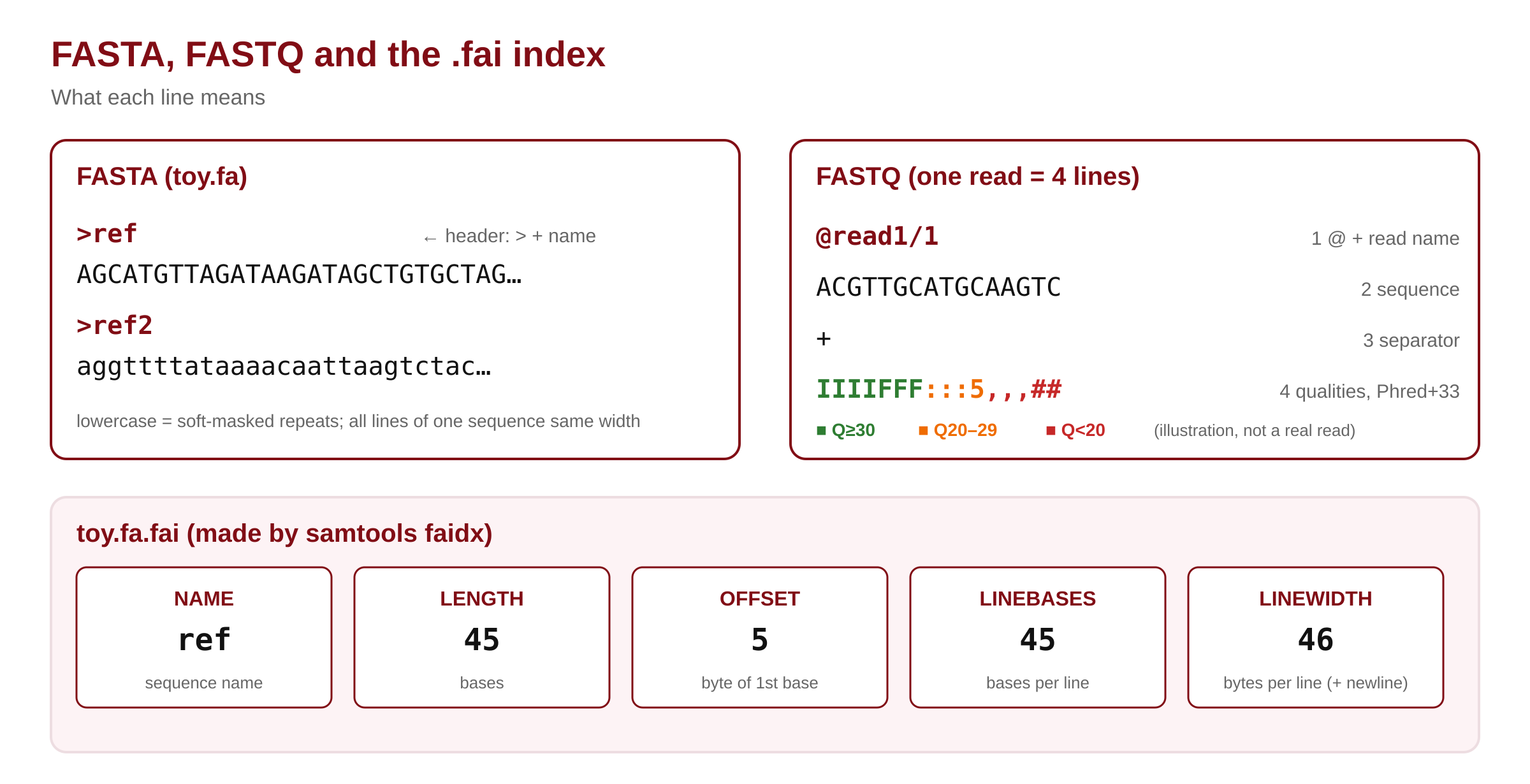
FASTA is the simplest format. A header line starts with > and gives the sequence name. All following lines, until the next >, are the sequence. That is the whole format.
cat toy.fa- Name: the text after
>up to the first space is the sequence ID. Here:refandref2. Anything after the first space is a free description, and most tools ignore it. - Sequence lines: real genome FASTA files wrap the sequence at a fixed width, usually 60 or 80 letters per line. Every line of one sequence must have the same length, except the last.
- Lowercase letters: in reference genomes, lowercase marks repeats (“soft-masking”). The bases are still real;
ref2is simply all lowercase here.
Letters other than A, C, G and T are allowed. They follow the IUPAC code:
| Code | Means | Code | Means |
|---|---|---|---|
| N | any base (unknown) | R | A or G (purine) |
| Y | C or T (pyrimidine) | S | G or C (strong) |
| W | A or T (weak) | K | G or T |
| M | A or C | B / D / H / V | not A / not C / not G / not T |
Protein FASTA uses the one-letter amino-acid code instead, often with * for a stop. The extension (.faa, .fasta) does not tell a tool whether it is DNA or protein, so always check with head.
Count, measure and index a FASTA file
grep -c ">" toy.fa
seqkit stats toy.fa
seqkit fx2tab -n -l -g toy.fa
grep -c ">": counts header lines, which equals the number of sequences. Always use quotes, or the shell reads>as “write to a file” and empties your data.seqkit stats: number of sequences, total, minimum, average and maximum length.seqkit fx2tab -n -l -g: one line per sequence: name (-n), length (-l) and GC % (-g).
Now build the FASTA index and pull out a region. Region strings like ref:7-18 are 1-based and include both ends.
samtools faidx toy.fa
cat toy.fa.fai
samtools faidx toy.fa ref:7-18The .fai file has five tab-separated columns: NAME, LENGTH (bases), OFFSET (byte where the sequence starts), LINEBASES (bases per line) and LINEWIDTH (bytes per line, including the newline). For ref: 45 bases, starting at byte 5 (after >ref and its newline), on one line of 45 bases, 46 bytes wide. The first two columns are also the quickest way to get a “chromosome sizes” file.
▸ Go deeper: how samtools finds base 1,000,000 without reading the file
Because every line has the same length, the byte position of any base can be calculated. That is why samtools faidx refuses files with uneven line lengths.
# Byte offset of 1-based position pos in sequence s (pseudo-code)
row    = (pos - 1) // LINEBASES[s]        # which sequence line
col    = (pos - 1) %  LINEBASES[s]        # which letter on that line
offset = OFFSET[s] + row * LINEWIDTH[s] + col
seek(offset); read the base
Example: ref position 7 → row 0, col 6, offset 5 + 0 + 6 = byte 11. The tool reads one byte. For a 3-billion-base genome, the work is the same.
For FASTQ, samtools fqidx writes a sixth column, QUALOFFSET, the byte where the qualities start (htslib faidx(5) manual).
🔬 Researcher notes: choosing and checking a reference FASTA
Download references from the source you will cite (Ensembl, GENCODE, NCBI RefSeq/GenBank, UCSC) and record the release. Ensembl offers dna (unmasked), dna_sm (soft-masked: repeats in lowercase) and dna_rm (hard-masked: repeats replaced by N); most aligners want unmasked or soft-masked sequence, never hard-masked.
For vertebrate genomes, prefer the primary_assembly file over toplevel: toplevel also contains haplotype and patch sequences, which make reads look multi-mapped and lower their MAPQ.
Check integrity before a long run: md5sum against the provider’s checksum, samtools faidx (fails on uneven lines), and grep -c ">" for the expected number of sequences. Keep the .fai, .dict (GATK) and aligner indexes next to the FASTA and rebuild all of them if the FASTA changes.
FASTQ: reads with qualities
FASTQ adds a quality score to every base. Each read takes exactly four lines: @ + read name, the sequence, a + line, and one quality character per base. Let’s make a FASTQ file from our alignments, so you can see one:
samtools fastq toy.sam > toy.fq
head -n 8 toy.fq
seqkit stats toy.fq
samtools fastq: turns alignment records back into reads. Reads on the reverse strand are flipped back to their original orientation.> toy.fq: saves the result to a file.
The first reads in toy.sam have no stored qualities (*), so samtools wrote a placeholder character for every base. Real FASTQ from a sequencer has a different character for each base. The character encodes the Phred quality Q:
- Q = −10 × log10(P), where P is the chance the base is wrong. Q20 = 1 error in 100, Q30 = 1 in 1,000, Q40 = 1 in 10,000.
- Character = Q + 33 in ASCII (“Phred+33”). So
I(73) is Q40,5(53) is Q20 and#(35) is Q2.
The full story of qualities, Phred+64 and how to check reads is in our FastQC and MultiQC tutorial. Here, remember three format rules: reads in _R1 and _R2 files are paired by their order, so never sort or filter one file alone; the + line may repeat the name but usually does not; and @ can also be a quality character, so never find reads with grep "^@". Count lines and divide by 4 instead.
echo $(( $(wc -l < toy.fq) / 4 ))▸ Go deeper: reading an Illumina read name
Illumina software (bcl2fastq and BCL Convert) writes read names like @A00123:45:HXXXXXXX:2:1101:12345:1000 1:N:0:ATCACG+TTAGGC. Before the space: instrument, run number, flowcell ID, lane, tile, and the x and y position of the cluster. After the space: read number (1 or 2), whether the read was filtered (Y/N), a control number, and the sample index sequence(s).
This is useful: reads from the same tile and nearby x/y coordinates that share a sequence are likely optical duplicates, and the lane field lets you add correct read groups (Chapter 3) when one sample was sequenced on several lanes.
🔬 Researcher notes: FASTQ variants and pitfalls
Cock et al. (2010, Nucleic Acids Research) documented three FASTQ variants: Sanger (Phred+33, the standard today), Solexa (Solexa scores with offset 64) and Illumina 1.3+ (Phred+64). Data archived before about 2011 may still be Phred+64; FastQC reports the guess in its “Encoding” line, and seqkit convert can convert.
The FASTQ format allows sequences and qualities to wrap over several lines, though almost no modern tool writes them that way. Simple line-counting scripts assume four lines per record; if a file fails that check, validate it with seqkit stats or seqkit seq -v.
Interleaved FASTQ stores R1 and R2 alternately in one file. Many aligners accept it with a flag (for example bwa mem -p), but tools that expect two files will treat each mate as a separate read.